Have you noticed your website traffic suddenly dropping without warning? It’s frustrating and confusing, especially when you rely on steady visitors to grow your business or share your message.
But don’t panic—this sudden dip isn’t always a disaster. Understanding why your website traffic took a hit is the first step to fixing it quickly and getting back on track. You’ll discover the most common reasons behind sudden traffic drops and what you can do right now to recover.
Keep reading to take control of your website’s performance before it slips even further.

Credit: conroycreativecounsel.com
Common Causes
Website traffic can drop suddenly for many reasons. Understanding the common causes helps you fix the problem fast. Traffic loss affects your business and visibility. Knowing what to check first saves time and money.
Server And Hosting Issues
Server problems often cause traffic drops. Hardware failures or power outages can take your site offline. Hosting providers may face technical difficulties too. These issues stop visitors from reaching your website.
Traffic Overload
A sudden rush of visitors can overload your server. Viral content or promotions bring many users at once. Servers not built for high traffic may crash. This stops new visitors from accessing your site.
Security Attacks
Hackers can attack your website using various methods. DDoS attacks flood servers with fake traffic. Malware infections can block real users. Security breaches harm your site’s reputation and traffic.
Human Mistakes
Errors by website owners or developers are common. Deleting important files or bad code changes cause issues. Misconfigurations can block search engines or visitors. Small mistakes can lead to big traffic drops.
Software Glitches
Software updates sometimes cause problems. Conflicts between plugins, themes, or CMS versions break sites. Bugs can stop pages from loading correctly. Testing updates before applying them avoids glitches.
Expired Domains
Not renewing your domain name makes your site disappear. Visitors get error messages or cannot find your site. Domain expiration is a simple but overlooked cause. Always check your domain’s renewal date.
Database And Resource Limits
Your website relies on databases and server resources. Exceeding bandwidth or memory limits causes downtime. Database errors prevent content from loading. Monitor your site’s resource usage regularly.
Types Of Downtime
Downtime is a common reason for sudden drops in website traffic. It means your site is temporarily unavailable to visitors. Downtime can happen in different ways. Knowing the types helps you identify and fix issues faster.
Scheduled Maintenance
Scheduled maintenance is planned downtime for updates or fixes. Website owners do this to improve performance or security. Usually, it happens during low traffic times to reduce impact. Visitors might see a message explaining the site is temporarily offline. This type of downtime is normal and controlled.
Unexpected Failures
Unexpected failures are unplanned and can cause serious problems. These include server crashes, software bugs, or cyberattacks. Such failures make your site inaccessible without warning. Visitors get errors or blank pages. These issues need quick action to restore the site and traffic.
Search Algorithm Effects
Search engines use complex algorithms to decide which websites appear first in search results. These algorithms change often. Such changes can cause sudden drops in website traffic. Understanding how search algorithm effects impact your site helps to identify the problem quickly.
Small shifts in ranking or penalties can lead to fewer visitors. Staying aware of algorithm updates and ranking status is important for maintaining steady traffic.
Algorithm Updates
Search engines release updates to improve their results. These updates can change how websites are ranked. A site that once ranked high may lose positions. This drop can reduce visitor numbers dramatically. Updates focus on content quality, user experience, and site speed. Sites that do not meet new standards may suffer in rankings.
Ranking Drops
Ranking drops happen when a site falls below competitors. This shift can cause a sharp decline in clicks. Lower ranking means fewer people find your page. Small changes in keyword rankings can have big effects. Tracking rankings helps spot drops early. Fixing issues quickly can restore lost traffic.
Penalty Risks
Search engines may penalize sites that break their rules. Penalties reduce visibility or remove sites from results. Common causes include spammy links, duplicate content, or hidden text. Penalties can cause sudden, severe traffic drops. Regular audits help avoid penalties. Removing bad links and improving content reduces risk.
Tracking And Analytics Errors
Tracking and analytics tools are key to understanding website traffic. Errors in these tools can falsely show a drop in visitors. This can cause worry and confusion for site owners.
Sometimes the traffic is steady, but the data is wrong. Problems with tracking setup or user settings may hide real visitor numbers. Other times, natural traffic changes happen and appear as errors.
Broken Analytics Setup
Incorrect or missing tracking codes stop data from being collected. A small change in website code can break analytics tools. Without proper setup, visits do not register in reports. This makes traffic look like it dropped suddenly.
Check if the analytics code is on every page. Verify no recent changes removed or altered the tracking script. Fix broken setups to restore accurate data.
User Tracking Opt-outs
More users now choose to block tracking cookies. Browsers and privacy tools limit data collection. This reduces the number of tracked visits.
Visitors may still come, but analytics shows fewer sessions. Respecting user privacy is important, but it affects traffic reports. Monitoring other metrics like server logs can help confirm real visitor counts.
Seasonal Traffic Shifts
Some drops reflect normal seasonal changes, not errors. Holidays, school breaks, or weather patterns change visitor habits. Analytics may show declines during off-peak times.
Review past data to spot recurring trends. This helps separate real drops from tracking mistakes. Prepare content and marketing plans around expected seasonal shifts.
Fixing Traffic Drops Quickly
A sudden drop in website traffic can cause worry and confusion. Fixing traffic drops quickly helps restore site performance and user trust. Acting fast prevents long-term damage to your search rankings and audience engagement.
Follow these clear steps to identify issues and recover lost visitors effectively. Each step targets a key area that impacts your site’s visibility and traffic flow.
Verify Traffic Data
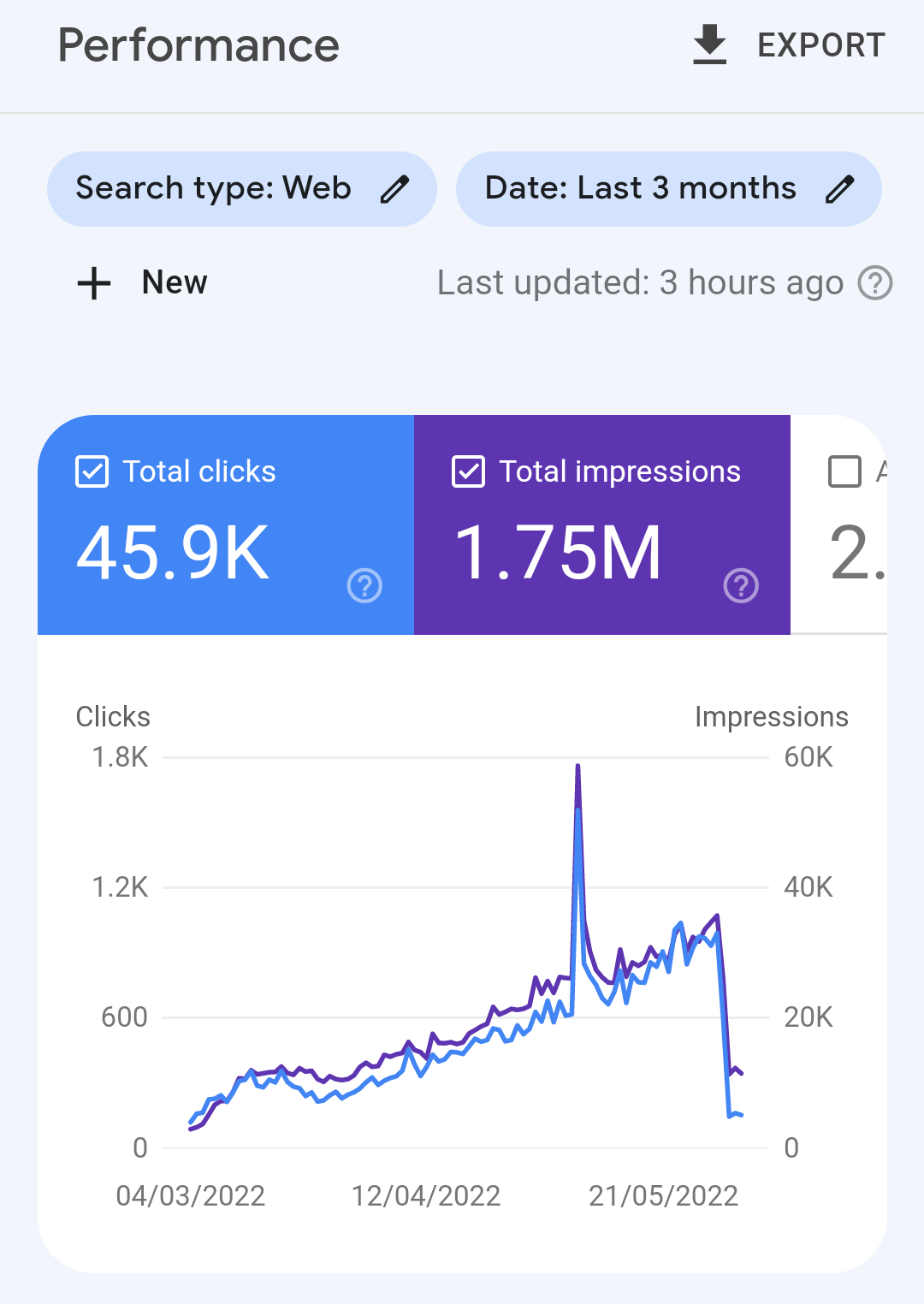
Start by checking your analytics platform. Confirm the traffic drop is real and not a tracking error. Look for sudden changes in sessions, users, or pageviews. Compare data across different tools to ensure consistency. Identify which pages or sources lost traffic the most.
Check Site Indexing
Use Google Search Console to verify if your pages are indexed. A drop in indexed pages can reduce your site’s visibility. Check for crawl errors or blocked URLs in the robots.txt file. Submit a sitemap again to prompt reindexing. Ensure no accidental noindex tags are present.
Audit Recent Changes
Review any website updates or changes made before the traffic drop. Look at content edits, design tweaks, or new plugins installed. Check if any code changes caused errors or slow loading times. Undo recent changes if they coincide with traffic loss. Test your site on multiple devices.
Update Content Strategically
Refresh your existing content with new information and keywords. Focus on improving quality and user experience. Add relevant images, videos, or infographics to engage visitors. Remove outdated facts or broken links. Regular updates signal search engines your site is active.
Improve Long-tail Keywords
Target specific, longer search phrases that users type. Long-tail keywords bring more qualified and less competitive traffic. Use tools to find relevant phrases your audience searches for. Incorporate these keywords naturally in titles, headings, and content. This strategy attracts visitors ready to take action.
Credit: support.google.com
Preventing Future Drops
Preventing sudden drops in website traffic requires steady care and smart planning. Protecting your site ensures visitors keep coming back. Simple steps can reduce risks and keep your traffic stable.
Choose Reliable Hosting
Select a hosting provider known for uptime and speed. Reliable hosting avoids frequent downtime or slow loading. Your site should handle traffic spikes without crashing. Check reviews and uptime guarantees before choosing a host.
Regular Site Audits
Perform site checks often to find errors or broken links. Audits help catch SEO issues that lower rankings. Fixing problems quickly keeps your site healthy. Use tools to scan for technical issues and improve performance.
Security Enhancements
Secure your website against hacks and malware attacks. Use strong passwords and update software regularly. Install security plugins and enable firewalls. Regular scans can detect threats before damage occurs.
Backup And Recovery Plans
Create backups of your website data frequently. Store copies offsite or in the cloud. Backups allow quick restoration after crashes or attacks. Test recovery steps so you know how to act fast.

Credit: digitalcommerce.com
Frequently Asked Questions
Why Is My Website Traffic Dropping Suddenly?
A sudden drop in website traffic often results from search algorithm updates, ranking losses, or penalties. Server issues, broken links, incorrect robots. txt, and tracking errors can also cause declines. Check these factors promptly to identify and fix the problem.
What Causes Websites To Go Down?
Websites go down due to server failures, excessive traffic, cyberattacks, human errors, expired domains, software bugs, or database issues disrupting access.
Why Are My Page Views Going Down?
Page views drop due to Google ranking changes, broken analytics tracking, seasonal trends, or reduced user interest. Check for tracking issues and algorithm updates.
How Would You Handle A Sudden Drop In Organic Traffic?
Analyze recent algorithm updates and check Google Search Console for penalties. Review site for technical errors, broken links, or server issues. Audit content quality and keyword rankings. Fix tracking code problems and improve user experience. Monitor traffic patterns to identify and resolve the drop quickly.
Conclusion
Sudden drops in website traffic often signal underlying issues. Check for recent algorithm updates or penalties. Review server and hosting health to avoid downtime. Watch for security threats like hacks or DDoS attacks. Avoid human errors by testing code and configurations carefully.
Keep domains and hosting plans active to maintain access. Monitor plugins and software to prevent conflicts or bugs. Regular checks and quick fixes help keep traffic stable. Understanding these causes helps you respond faster and protect your site. Stay vigilant to keep your website performing well.