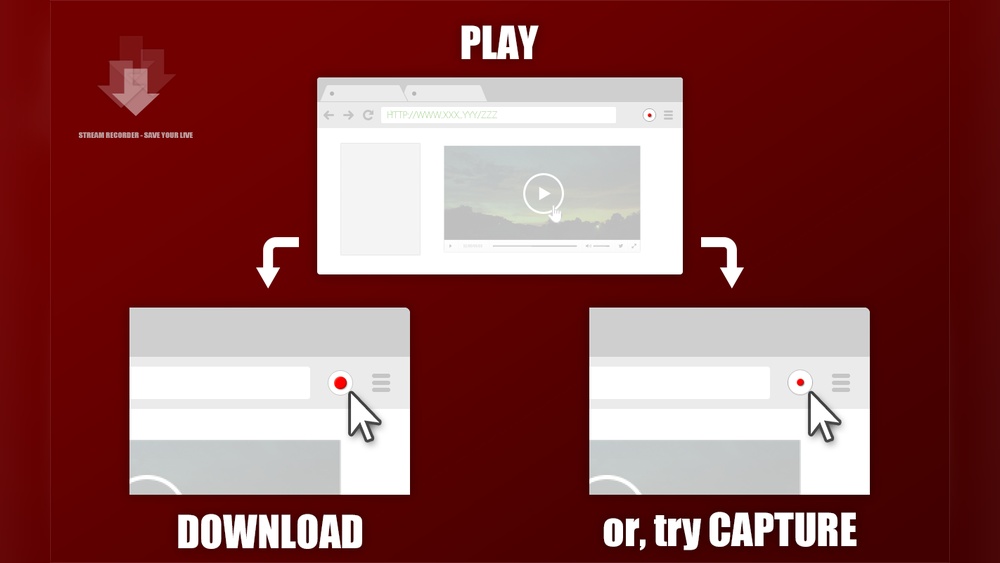
Are you tired of missing out on your favorite live streams or online videos when you can’t watch them in real-time? Imagine having the power to capture those moments and save them for later, right on your device.
That’s exactly what a stream recorder does for you. But what is a stream recorder, and how can it make your streaming experience better? You’ll discover everything you need to know about stream recorders—from how they work to the best ways to use them.
Keep reading, and you’ll soon have the tools to take control of your streaming content like never before.
Stream Recorder Basics
Stream recorders help capture videos and audio from online streams. They let users save live or on-demand content directly to their devices. This tool is useful for watching streams offline or keeping a copy for later. Understanding the basics of stream recorders helps users choose the right tool for their needs.
What Stream Recorder Does
A stream recorder captures video or audio from online streams. It saves the streamed content as a file on your device. Users can record live broadcasts or replay videos. This tool often works as a browser extension or standalone app. It helps keep content for offline viewing without needing internet access.
Supported Platforms And Browsers
Stream recorders usually support popular browsers like Chrome and Firefox. Many come as extensions for easy access while browsing. Some recorders also work on Windows and Mac computers. Mobile platform support varies; some apps work on Android or iOS. Always check compatibility before installing a stream recorder.

Credit: www.techsmith.com
Key Features
The key features of a stream recorder make capturing and saving online videos simple and efficient. These tools help users save live broadcasts and on-demand videos without fuss. Understanding these features clarifies why stream recorders are popular among many users.
Live Stream Capture
Stream recorders allow real-time recording of live broadcasts. They capture video and audio directly as the stream plays. This feature ensures users do not miss any part of live events. It works well for sports, webinars, or concerts online.
On-demand Video Download
Users can download videos available on demand with ease. This means saving movies, tutorials, or shows to watch offline. The process is fast and keeps the original video quality intact. It is helpful for watching content without internet access later.
Cloud Storage Options
Many stream recorders offer cloud storage for saved files. This lets users keep videos online and access them from any device. Cloud storage frees up space on local drives. It also adds a layer of security and backup for important videos.
Webcam Overlay And Screen Switching
This feature allows adding webcam footage over the recorded stream. Users can switch between the screen and webcam during recording. It is useful for creating commentary or reaction videos. The tool helps make videos more engaging and personal.
Pricing And Alternatives
Understanding the pricing options and alternatives for Stream Recorder helps you choose the best tool. Stream Recorder offers both free and paid plans. Different versions have unique features and limitations. Exploring alternatives can reveal other useful recorders. Offline recording also has important benefits worth noting.
Free Vs Paid Versions
The free version of Stream Recorder lets users capture streams with basic tools. It often restricts downloads or saves files only to the cloud. Paid versions provide more control, like offline saving and higher quality videos. Users pay to unlock advanced functions and remove limits. Choosing between free and paid depends on your recording needs.
Top Alternative Recorders
Several recorders serve as strong alternatives to Stream Recorder. CleverGet offers faster recording and better video quality. OBS Studio allows full offline recording with many customization options. Audials One focuses on audio and video capturing with easy editing. These alternatives might suit users needing specific features.
Offline Recording Benefits
Recording streams offline means saving files directly to your device. This avoids relying on internet speed or cloud storage limits. Offline recording lets you access videos anytime without internet. It also offers better privacy and control over your content. Many users prefer offline tools for these advantages.

Credit: www.awesomescreenshot.com
Legal And Privacy Considerations
Using a stream recorder raises important legal and privacy questions. Understanding these issues helps avoid trouble and respect content creators’ rights. This section covers key points about streaming laws and privacy concerns.
Public Vs Private Streaming Rules
Streaming in public places often has fewer restrictions. Many countries protect public recordings under free speech laws. Private streaming, such as inside a home, has stricter rules. Recording without permission in private spaces can violate privacy laws. Always check local rules before recording streams in different settings.
Copyright And Usage Guidelines
Most streaming content is protected by copyright. Downloading or saving streams without permission may break copyright laws. Using recorded streams only for personal use is sometimes allowed. Sharing or selling recorded content without consent is usually illegal. Respect copyright rules to avoid penalties and support creators.
Potential Legal Risks
Recording streams without permission can lead to legal issues. This includes lawsuits, fines, or account bans from streaming platforms. Some countries have strict penalties for unauthorized recording. Privacy violations may also cause legal trouble. Understanding risks helps you stay safe and avoid unwanted consequences.
User Experience And Reviews
User experience plays a key role in choosing a stream recorder. Reviews from real users reveal how easy the tool is, its performance, and common issues. This feedback helps others decide if it suits their needs. Below, we explore user insights on different aspects of stream recorders.
Ease Of Use
Most users find stream recorders simple to install and start. The interface is usually clean with clear buttons for recording and saving. Beginners appreciate tools that do not require technical knowledge or complex settings. Quick setup and intuitive controls make the experience smooth. Some users mention helpful guides or tutorials included with the software.
Performance And Quality
Users report that many stream recorders deliver good video and audio quality. The recordings capture streams clearly without lag or glitches. Fast processing speeds allow saving content quickly, even for longer videos. Some tools support various formats and resolutions, which users find valuable. Consistent performance during live streams is a major plus for many reviewers.
Common User Complaints
Users sometimes face issues like limited free features or slow downloads. Some report that the tool crashes or freezes in rare cases. Ads or paywalls can interrupt the recording process, which frustrates users. There are occasional problems with audio sync or video quality dropping. Customer support response times vary, affecting overall satisfaction.
Credit: www.leawo.com
Security And Trust Issues
Security and trust are important when using a stream recorder. Users must be careful about how their data is handled and what rules the tool follows. Many questions arise about privacy, access, and community opinions.
This section explores common concerns to help you make informed choices.
Data Privacy Concerns
Stream recorders often require access to personal data. This can include browsing habits and login details. Some tools store this data on their servers, raising privacy risks. Users should check privacy policies carefully. Avoid sharing sensitive information unless the service is trusted and secure.
Paywall And Access Restrictions
Some stream recorders limit free use by placing content behind paywalls. This means you may record streams but cannot download or watch them without payment. These restrictions can be frustrating. Understanding the cost structure before using a service helps avoid surprises.
Community Feedback
Feedback from other users reveals real experiences with stream recorders. Many share concerns about hidden fees and data security. Others praise easy-to-use interfaces and reliable recording. Reading reviews on forums and sites like Reddit offers useful insights. Community opinions help gauge trustworthiness and performance.
Recording Tips And Best Practices
Recording live streams or on-demand videos requires smart techniques. Following clear tips improves your recording experience. These best practices help capture better videos and save storage space. Switching between sources becomes smoother with the right approach. Use these simple guidelines to get the most from your stream recorder.
Optimizing Video Quality
Choose the highest available resolution for sharp videos. Set the frame rate to match the source stream for smooth playback. Avoid recording during network slowdowns to reduce lag and pixelation. Use a stable internet connection to keep the stream steady. Adjust brightness and contrast settings if your recorder allows it.
Managing Storage Efficiently
Record only the parts you need to save disk space. Use compressed file formats like MP4 to reduce file size. Regularly delete old or unwanted recordings to free up storage. Store videos on external drives or cloud storage to avoid device overload. Check available storage before starting a new recording session.
Switching Between Sources Seamlessly
Prepare all streaming sources before recording. Use software with easy source-switching features to avoid interruptions. Practice switching sources smoothly to keep recordings professional. Label each source clearly to avoid confusion during recording. Test transitions to ensure no video or audio is lost.
Frequently Asked Questions
What Does A Streamrecorder Do?
A StreamRecorder captures and saves live or on-demand streaming videos directly from browsers. It enables offline viewing anytime.
Does A Streamrecorder Cost Money?
StreamRecorder offers free cloud-only storage but charges for downloading streams. Full offline access requires payment.
Is Stream Recording Legal?
Stream recording legality depends on content and location laws. Recording public streams is often legal. Recording private streams may require permission. Always respect copyright and privacy rules to avoid legal issues.
Can Streamrecorder Record My Screen?
StreamRecorder primarily captures streaming media but does not record your entire screen. It focuses on saving live or on-demand videos.
Conclusion
A stream recorder helps you save online videos easily. It captures live or recorded streams directly from your browser. This tool suits those who want to watch streams offline later. Some versions offer free use with limits, while others need payment for full features.
Always check the legal rules before recording streams. Choose a recorder that fits your needs for quality and ease. Using stream recorders can make video access more flexible and convenient.