Have you ever wondered who made the device connected to your network? Every device has a unique identifier called a MAC address, and hidden within it is a code that reveals its manufacturer.
This is where a MAC Address Vendor Lookup comes in handy. By understanding what it is and how it works, you can quickly identify the vendor behind any device on your network. Whether you’re troubleshooting, managing your devices, or just curious, knowing how to perform a MAC Address Vendor Lookup puts valuable information at your fingertips.
Keep reading to discover how this simple tool can give you clear insights into your network’s devices.
Mac Address Basics
Understanding the basics of a MAC address is key to grasping how devices communicate on a network. A MAC address acts like a unique name tag for each device. It helps networks identify and manage devices efficiently.
Each MAC address is built with a specific format. This format ensures every device has a unique address. Knowing how these addresses work helps explain why vendor lookup tools exist.
Structure Of A Mac Address
A MAC address contains 12 hexadecimal digits. These digits are grouped in pairs, often separated by colons or hyphens. The address is split into two main parts.
The first half identifies the device’s manufacturer. The second half is a unique number assigned by that manufacturer. This structure keeps every MAC address unique worldwide.
Role Of The Vendor Identifier
The vendor identifier is the first six digits of the MAC address. It is also called the Organizationally Unique Identifier (OUI). This part tells which company made the network device.
Manufacturers register their OUIs with global authorities. This registration prevents address conflicts between different vendors. Knowing the vendor helps in troubleshooting and managing networks.
Why Uniqueness Matters
Uniqueness in MAC addresses prevents device conflicts on the same network. If two devices had the same address, communication errors would occur. Unique MAC addresses ensure smooth data transfer.
Network security also benefits from unique addresses. It helps identify and block unauthorized devices. This way, networks stay safer and more reliable.
Credit: dnschecker.org
Vendor Lookup Explained
Understanding vendor lookup helps identify the maker of a network device. It reveals the company behind a MAC address. This process is essential for network management and security checks.
Vendor lookup uses specific parts of the MAC address. It connects the address to the manufacturer. This knowledge supports device tracking and troubleshooting.
What Is Oui
OUI stands for Organizationally Unique Identifier. It is the first half of a MAC address. Each OUI is assigned to a specific vendor by IEEE. This unique code identifies the device maker worldwide.
How Lookup Works
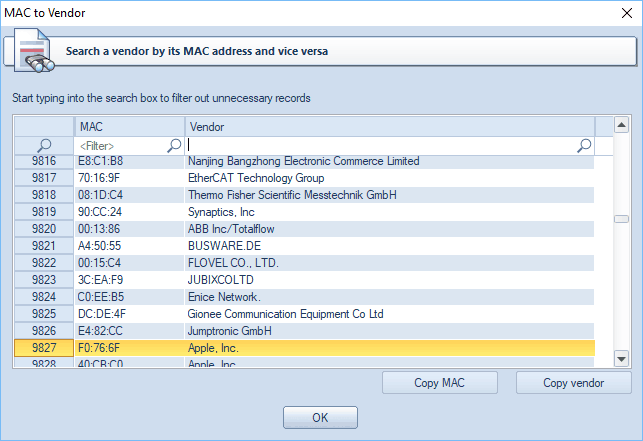
The lookup reads the OUI part of the MAC address. It compares this to a database of OUIs and vendors. The result shows the manufacturer’s name. This helps recognize devices on a network.
Tools For Mac Lookup
Many online tools allow quick MAC vendor lookup. They use updated databases to match OUIs. Users enter a MAC address to find the vendor. Some tools offer extra details about the device.
Finding Your Mac Address
Finding your MAC address is an important step before performing a MAC address vendor lookup. The MAC address is a unique identifier for your device’s network adapter. It helps identify the manufacturer and can be useful for troubleshooting and network management.
The process to find your MAC address varies by device and operating system. Below are simple methods for common platforms.
On Windows Pcs
Open the Command Prompt by typing cmd in the search bar. Type ipconfig /all and press Enter. Look for “Physical Address” under your active network adapter. This is your MAC address. Alternatively, go to Settings > Network & Internet > Wi-Fi or Ethernet. Click on the connected network and find the MAC address listed there.
On Macos Devices
Click the Apple menu and select System Settings or System Preferences. Choose Network and select your active connection (Wi-Fi or Ethernet). Click Advanced or Details, then go to the Hardware tab. Your MAC address appears labeled as “MAC Address” or “Wi-Fi Address.” You can also open Terminal and type ifconfig to find the MAC address under your network interface.
On Android And Ios
On Android, open Settings and tap About Phone or About Device. Select Status or Hardware Information. The MAC address is listed as Wi-Fi MAC address. On iOS, open Settings and go to General > About. Scroll to find the Wi-Fi Address, which is the MAC address of your device.
On Chromeos
Click the status area at the bottom right of the screen. Select the gear icon to open Settings. Click Network and choose your connected Wi-Fi or Ethernet. Find the MAC address listed under the network details. This is your device’s unique MAC identifier.

Credit: macvendors.com
Uses Of Vendor Lookup
Vendor lookup of a MAC address reveals the manufacturer of a network device. This information serves many practical purposes in managing and securing networks. Knowing the device vendor helps in various tasks related to network control and problem solving.
Network Security
Vendor lookup helps detect unauthorized devices on a network. Security teams can spot devices from unknown manufacturers quickly. This allows them to block or monitor suspicious connections. It also aids in enforcing network access policies based on device type.
Device Identification
Identifying a device’s vendor simplifies network inventory management. IT staff can classify devices without physical inspection. This speeds up tasks like asset tracking and software updates. It also helps in understanding network composition at a glance.
Troubleshooting Connections
When network issues arise, vendor details provide clues about the device involved. Knowing the manufacturer can guide technicians to specific fixes. Some vendors have known issues or require special settings. This makes problem diagnosis faster and more accurate.
Limitations And Challenges
Mac Address Vendor Lookup is helpful but not perfect. It has some limits and problems that users should know. These issues can affect the results and how useful the lookup is for security or device identification.
Mac Spoofing Risks
MAC spoofing means changing a device’s MAC address to fake its identity. This tricks the vendor lookup tool, showing the wrong manufacturer. Spoofing hides the real device maker and can cause security risks. It makes it hard to trust the lookup results fully.
Vendor Database Accuracy
Vendor lookup tools use databases listing MAC address blocks assigned to companies. These databases may not always be up to date or complete. New manufacturers or changes may not appear right away. Errors or missing data can cause wrong vendor information. This reduces the reliability of the lookup service.
Advanced Insights
Advanced insights from a MAC address vendor lookup offer valuable details. These details go beyond just identifying the device maker. They help reveal hidden information about the device environment and origin. Such insights aid network administrators and security experts in understanding device behavior and authenticity. Below are some key advanced uses of MAC address vendor lookup.
Detecting Virtual Machines
MAC addresses help identify virtual machines (VMs) on a network. Many VM software assigns MAC addresses with specific vendor codes. These codes differ from physical device manufacturers. By checking the vendor part of a MAC address, you can spot VM instances. This helps in managing network resources and security. It also aids in detecting unauthorized virtual devices.
Tracking Device Origins
Each MAC address contains a unique vendor identifier. This identifier shows the device’s original manufacturer. Tracking this info helps verify device authenticity and source. It also assists in troubleshooting network issues. Knowing the device origin improves asset management and inventory control. It supports investigations into network breaches or suspicious activity.
Credit: www.passcape.com
Frequently Asked Questions
What Part Of The Mac Address Identifies The Vendor?
The first half of a MAC address, called the Organizationally Unique Identifier (OUI), identifies the vendor or manufacturer.
Can You Identify A Manufacturer From The Mac Address?
Yes, the first three sets of a MAC address, called the OUI, identify the device manufacturer. This helps pinpoint the NIC maker.
How Do I Perform A Mac Address Lookup?
Open your device’s network settings or use command line tools like ipconfig (Windows) or ifconfig (macOS/Linux). Locate the “Physical Address” or “MAC Address” under your active network adapter to perform a MAC address lookup.
What Is The Mac Address Vendor 28 29 86?
The MAC address vendor 28:29:86 belongs to Shenzhen Xunlong Software CO. ,LTD. It identifies the device manufacturer.
Conclusion
A MAC address vendor lookup helps identify device manufacturers. It uses the first part of the MAC address to find the vendor. This tool is useful for network management and security checks. Anyone can perform a lookup using simple online tools or device settings.
Knowing the vendor can help track devices or troubleshoot issues. Understanding this process makes network tasks easier and clearer. Keep this method in mind when managing your devices or networks.