Have you ever noticed your Android phone slowing down or acting a bit glitchy? One of the simplest tricks to fix this might be right at your fingertips—clearing the cache.
But what does clearing cache actually do on your Android device? Is it safe? Will you lose important data? Understanding this can help you keep your phone running smoothly without risking your personal info. You’ll discover exactly what happens when you clear cache, why it matters, and how to do it the right way.
Stick around, because once you know this, your Android experience will feel faster and more reliable.

Credit: www.avg.com
Cache Basics
Cache plays a key role in how Android devices work. It helps apps and websites load faster. Cache stores small bits of data from apps and browsers. This data lets your device remember info without downloading it again. Understanding cache helps explain why clearing it can fix problems.
What Cache Stores
Cache stores temporary files like images, scripts, and data. These files come from apps you use often. For example, a social media app saves profile pictures in cache. This way, it does not download the same pictures repeatedly. Browsers also save website data to load pages quickly.
Cache keeps data that your device thinks you might use again soon. It helps apps open faster and run smoother. But cache does not store important personal info or settings. It only holds files needed to speed up tasks.
Why Cache Exists
Cache exists to improve speed and reduce data use. Without cache, apps would load all data fresh every time. This would make your device slow and drain battery faster. Cache cuts down on repeated downloads and saves processing power.
It also helps apps work offline or with a weak internet connection. Cached files let you see some content without waiting. Cache is a smart way to make your Android device more efficient.
Effects Of Clearing Cache
Clearing the cache on your Android device affects several aspects of its operation. This action removes temporary files stored by apps and the system. These files help apps load faster but can accumulate and cause issues over time. Understanding the effects of clearing cache helps you maintain your device’s health and performance.
Performance Boost
Removing cached files can speed up your phone. Old cache may slow down apps or the system. Clearing it allows apps to start fresh. This often improves responsiveness and reduces lag. The phone runs smoother without outdated temporary data.
Storage Space Freed
Cached data takes up space on your device. Over time, cache grows and fills storage. Clearing cache frees up this space quickly. More free storage means room for new apps, photos, or updates. It helps prevent storage-related slowdowns and errors.
Fixing App Glitches
Apps sometimes crash or freeze due to corrupted cache. Clearing cache can fix these glitches. It removes broken or outdated files causing errors. After clearing, apps reload data properly. This often solves performance and display problems.
Impact On Privacy
Cache stores temporary files from browsing and app use. Clearing it deletes some stored data like cookies. This reduces tracking by websites and apps. It enhances your privacy by removing parts of your activity history. However, it does not erase saved passwords or accounts.
Cache Vs Data Clearing
Understanding the difference between clearing cache and clearing data on Android is key to managing your apps effectively. Both actions free up space and can fix app problems. Yet, they do very different things. Knowing what each one removes helps you choose the right option without losing important information.
What Clearing Cache Removes
Clearing cache deletes temporary files stored by apps. These files include images, scripts, and other data that apps save to load faster. The cache helps apps open quickly and run smoothly. Removing it frees up space without affecting your personal settings or login details. Apps will rebuild the cache as you use them again.
What Clearing Data Removes
Clearing data erases all app information. This includes settings, accounts, saved games, and preferences. It resets the app to its original state, like when you first installed it. You lose all customizations and stored files inside the app. The app may ask you to log in again after data clearing.
Risks Of Clearing Data
Clearing data can cause inconvenience by deleting important information. You may lose progress in games or app-specific files. Some apps require reconfiguration after data is cleared. Avoid clearing data unless the app is malfunctioning or you want to start fresh. Always back up important information before clearing data.
When To Clear Cache
Knowing when to clear cache on your Android device helps keep it running smoothly. Cache stores temporary files that speed up apps and websites. Over time, these files can become outdated or corrupted. Clearing cache removes these files without affecting your personal data. This can improve performance and free up storage space. Here are key times to clear cache on your Android phone.
Regular Maintenance
Clearing cache regularly helps maintain your device’s speed. Temporary files build up with daily use. Removing them prevents slowdowns and lag. A monthly cache clear is enough for most users. It keeps apps fresh and responsive. This simple step supports better overall phone health.
Troubleshooting Apps
Apps sometimes crash or freeze due to corrupted cache files. Clearing cache can fix these problems quickly. It removes old data that causes conflicts. If an app acts strange or won’t load properly, clear its cache first. This often resolves issues without deleting your settings or data.
Storage Management
Cache files take up space on your phone. Over time, they can grow large and clutter your storage. Clearing cache frees up this space instantly. It helps when your device storage runs low. Regular cache cleaning can delay the need to delete apps or files. It is an easy way to manage your phone’s storage efficiently.
How To Clear Cache
Clearing cache on your Android device helps free up storage and improve app performance. Cache stores temporary files, images, and data that apps use to run faster. Over time, these files can pile up and cause apps to slow down or act strangely. Clearing cache removes these files without deleting important app data or settings. Here are simple ways to clear cache on your Android phone.
Clearing Individual App Cache
Open your phone’s Settings app. Scroll to “Apps” or “Apps & notifications.” Find and tap the app you want to clear. Tap “Storage” or “Storage & cache.” Select “Clear Cache.” This deletes temporary files for that app only. It helps fix issues with slow or crashing apps.
Clearing Browser Cache
Open your browser app, such as Chrome. Tap the menu icon (three dots) in the top right corner. Choose “History” or “Privacy.” Tap “Clear browsing data.” Select “Cached images and files.” Tap “Clear data” or “Clear cache.” This removes stored website files and speeds up browsing.
Using Device Settings
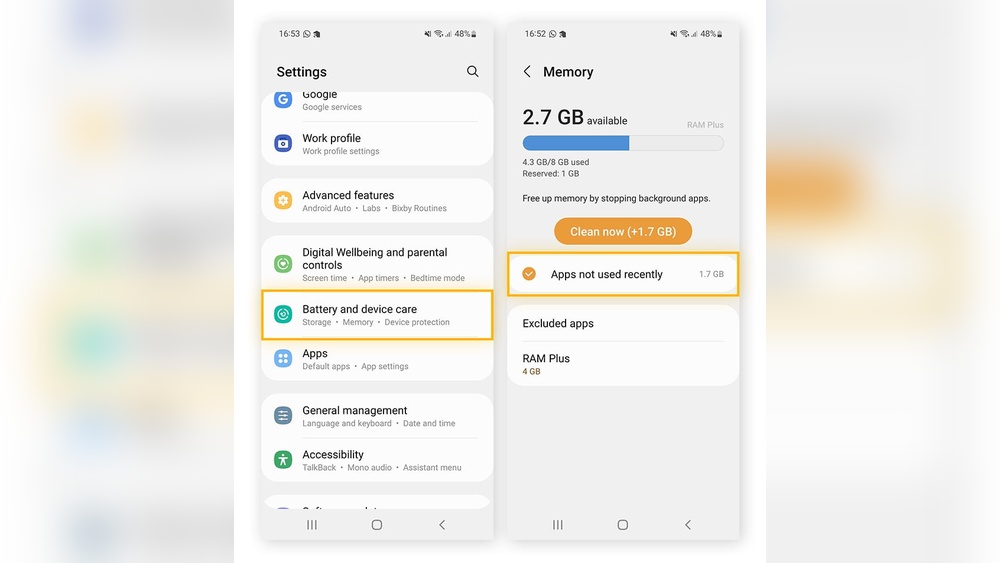
Go to your phone’s Settings. Tap “Storage” or “Device care.” Look for “Cached data” or a similar option. Tap it to clear cache for all apps at once. This frees up space quickly but may take longer to rebuild cache later. Use this method if your device is running low on storage.

Credit: www.rokform.com
Common Myths
Many people misunderstand what clearing cache does on Android devices. Some believe it harms the device or causes data loss. These common myths create confusion and hesitation. Understanding the truth helps you use cache clearing effectively.
Cache Clearing Slowing Down Device
Some think clearing cache makes their phone slower. Actually, cache stores temporary files to speed up apps. Removing these files means apps reload data fresh, which may take a bit longer at first. This is temporary and helps fix slow or buggy apps later.
Loss Of Personal Files
Clearing cache does not delete personal files or important data. It only removes temporary files that apps create to work faster. Your photos, messages, and settings stay safe. Clearing app data, not cache, can erase personal info, so be careful.
Need For Frequent Clearing
Many believe they must clear cache daily to keep the phone fast. This is not true. Cache helps apps run smoothly by saving data. Clearing cache once a month or when an app misbehaves is enough. Too much clearing can slow down app startup times.

Credit: www.rokform.com
Frequently Asked Questions
Is It Good To Clear The Cache On Android?
Clearing cache on Android improves performance, frees storage, and fixes app glitches by removing temporary files. It’s safe and helps apps run smoothly. Avoid clearing data, as it deletes settings and logins. Clear cache monthly or when apps misbehave for best results.
Will Clearing The Cache Delete Anything?
Clearing the cache removes temporary files but does not delete personal data like photos, documents, or contacts.
What’s The Difference Between Clearing Data And Clearing Cache?
Clearing cache removes temporary files to free space and fix app glitches. Clearing data deletes all app settings, accounts, and preferences. Cache clearing is safe and improves performance; data clearing resets the app to its original state.
Is It Better To Clear Storage Or Clear Cache?
Clearing cache removes temporary files, boosting app speed and fixing glitches without losing data. Clearing storage deletes all app data, including settings and logins, which resets the app. Clearing cache is better for routine maintenance, while clearing storage suits major app issues or resets.
Conclusion
Clearing cache on Android removes temporary files that slow your device. It frees up space and helps apps run smoother. This simple step can fix glitches and improve loading times. Apps rebuild cache quickly, so performance stays fast. Do this monthly or when apps act strangely.
Avoid clearing data unless you want to lose settings. Regular cache clearing keeps your phone clean and efficient. Try it to keep your Android working well without hassle.