You’re at your favorite coffee shop or waiting at the airport, and free public Wi-Fi is right there, tempting you to connect. It feels convenient, but have you ever stopped to wonder—how secure is public Wi-Fi really?
When you tap into these open networks, your personal data could be exposed without you even realizing it. From hackers lurking in the background to fake hotspots designed to steal your information, the risks are real and closer than you think.
But don’t worry—by understanding the dangers and learning simple steps to protect yourself, you can stay safe while enjoying the convenience of public Wi-Fi. Keep reading to discover how to spot threats, protect your data, and surf securely wherever you go.

Credit: www.stackfield.com
Public Wi-fi Risks
Public Wi-Fi exposes users to many security dangers. These networks often lack strong protection. This makes it simple for hackers to steal personal data. Understanding the main risks helps users stay alert and safe.
Many people assume public Wi-Fi is safe, but it is not. Learning about common threats can prevent serious problems like identity theft or malware infection.
Unsecured Networks
Most public Wi-Fi networks do not use encryption. This means data sent over the network is visible to others. Anyone nearby can capture your information with simple tools. Avoid sending passwords or private details on these networks.
Man-in-the-middle Attacks
Attackers can position themselves between you and the Wi-Fi router. They intercept and control all data you send and receive. This allows them to steal login credentials and personal messages. Such attacks are hard to detect without special software.
Fake Hotspots
Cybercriminals create Wi-Fi networks with names similar to real ones. Unsuspecting users connect to these fake hotspots. Once connected, hackers can monitor your traffic and collect sensitive data. Always confirm the exact network name with staff before connecting.
Data Theft
Public Wi-Fi makes it easier for thieves to access your personal files. They can grab passwords, credit card numbers, and other private information. Using unsecured networks increases the risk of identity theft. Protect your data by avoiding important transactions on public Wi-Fi.
Malware Threats
Hackers use public Wi-Fi to spread malware to connected devices. Malware can damage your system or steal information silently. Downloading files or clicking unknown links on public Wi-Fi increases this risk. Keep your device updated and use antivirus software to stay protected.
Untrusted Administrators
The person managing the public Wi-Fi can monitor all user activity. Rogue administrators might collect and misuse your data. Some networks log browsing habits and personal details without users’ knowledge. Use caution and limit sensitive actions on public Wi-Fi networks.
Tracking On Public Wi-fi
Public Wi-Fi networks offer easy internet access in cafes, airports, and hotels. However, these networks often track your online activities. Understanding how this tracking works helps you stay aware and protect your privacy. The owners of public Wi-Fi have tools to monitor and log your data. This means your browsing habits and personal information can be recorded without your knowledge.
Activity Monitoring By Owners
Wi-Fi owners can see the websites you visit and the time spent online. They use software to watch your activity in real time. This monitoring helps them manage network traffic and security. Sometimes, they also use it for marketing or legal reasons. Your data is visible to anyone with access to the network’s control panel. This means even simple actions like checking emails can be tracked.
Logging Of User Data
Public Wi-Fi networks often keep logs of user activities. These logs include websites visited, connection times, and sometimes device details. The data stays stored on the network for days or weeks. It can be shared with third parties or law enforcement if requested. Logging helps network owners analyze usage patterns and improve services. But it also increases the risk of your information being exposed.
Security Of Public Wi-fi Networks
Public Wi-Fi networks offer easy internet access in cafes, airports, and hotels. These networks can be either secured or unsecured. The security level impacts how safe your data remains while connected. Understanding the risks helps protect your personal information from hackers. Many users underestimate the dangers of public Wi-Fi and share sensitive data without caution. Awareness is key to avoiding cyber threats on these networks.
Risks Of Secured Vs Unsecured Networks
Secured public Wi-Fi networks use passwords and encryption. This makes it harder for hackers to intercept data. Unsecured networks have no password protection. Anyone nearby can join and spy on your activity. Fake hotspots can mimic real networks to steal your details. Even secured networks may have weak encryption or rogue administrators. Both types expose users to risks like data theft and malware infections.
When To Avoid Public Wi-fi
Avoid public Wi-Fi for sensitive tasks such as online banking. Entering passwords or credit card information on public networks is unsafe. Skip accessing private emails or confidential work files too. Using public Wi-Fi without protection can lead to identity theft. Switch to a mobile hotspot or wait for a trusted connection. Always use a VPN if public Wi-Fi is your only option.
Password And Data Theft Risks
Using public Wi-Fi exposes your personal information to serious risks. Open networks often lack strong encryption. This makes it easy for hackers to steal sensitive data. Passwords and private details become vulnerable. Understanding these risks helps you protect your information better.
Interception Of Credentials
Hackers can intercept usernames and passwords on public Wi-Fi. They use tools that capture data sent over the network. When you log into accounts, your credentials travel through the air unprotected. Attackers can grab this information and access your accounts. This risk grows if the website does not use HTTPS encryption.
Credit Card Information Exposure
Entering credit card details on public Wi-Fi can be dangerous. Cybercriminals may monitor network traffic and capture payment data. Fake Wi-Fi hotspots trick users into connecting, exposing their financial information. This data theft can lead to unauthorized purchases or identity theft. Avoid entering card details on unsecured networks to stay safe.
Safe Usage Tips
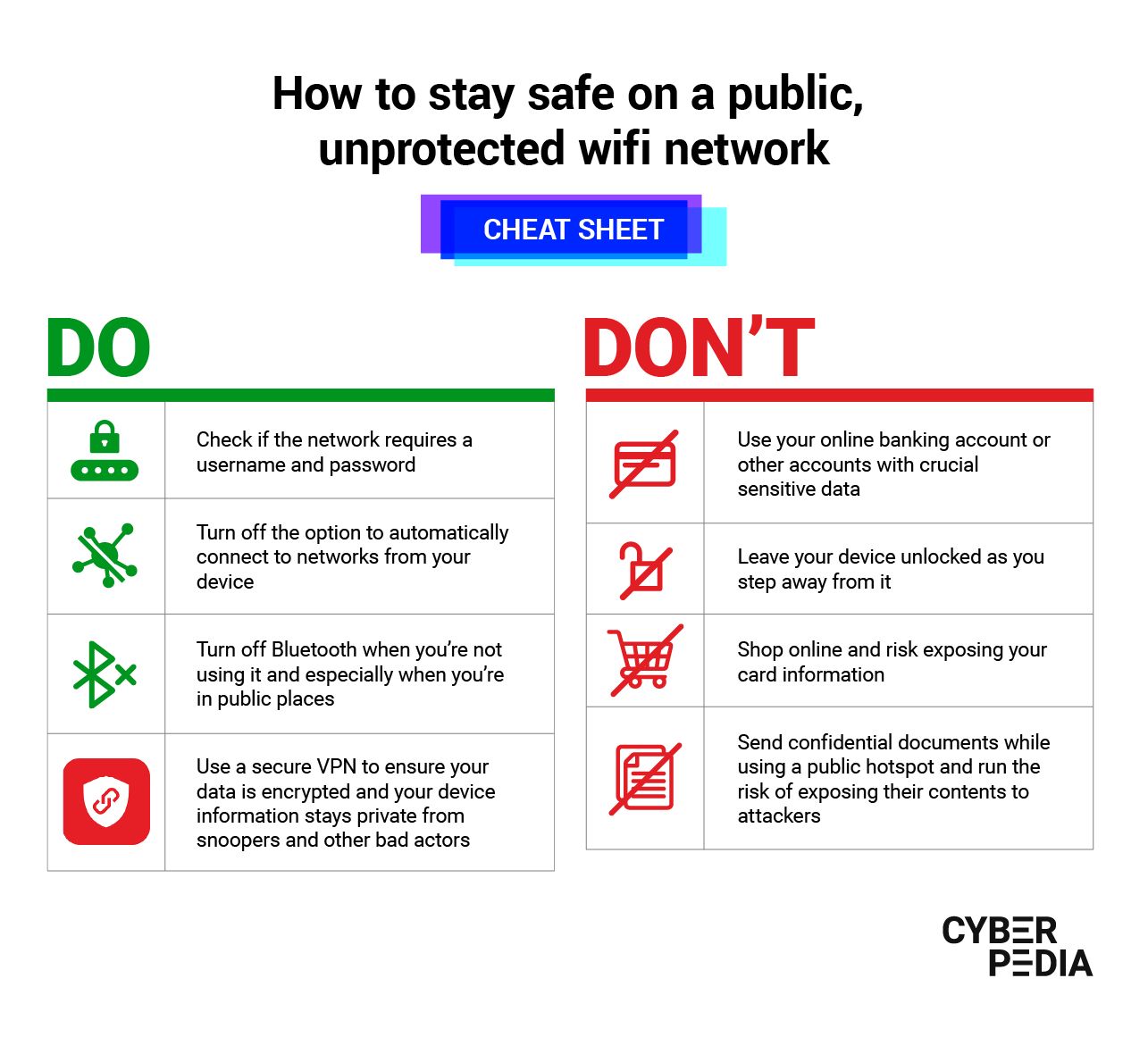
Using public Wi-Fi comes with risks. Your data can be exposed to hackers. Follow simple safety steps to protect yourself. These tips reduce chances of data theft and privacy breaches. Stay cautious and surf the internet safely on public networks.
Using A Vpn
A VPN encrypts your internet connection. It hides your data from hackers. Use a trusted VPN on public Wi-Fi. This keeps your browsing private and secure.
Verifying Network Names
Always check the Wi-Fi network name carefully. Fake hotspots often have names similar to real ones. Confirm the exact name with staff or signs. Avoid connecting to suspicious networks.
Disabling Auto-connect
Turn off auto-connect on your device. This prevents automatic joining of unknown networks. Choose networks manually to stay in control.
Turning Off File Sharing
Disable file sharing before using public Wi-Fi. This stops others from accessing your files. Adjust settings in your device’s control panel or system preferences.
Avoiding Sensitive Transactions
Do not perform bank transactions or shop online on public Wi-Fi. These actions expose your passwords and financial details. Use private or secured networks for sensitive tasks.
Checking For Https
Look for “https://” in website addresses. This means the site uses encryption. Avoid sites without HTTPS, especially for logins or payments.
Using Mobile Hotspots
Use your phone’s mobile hotspot for safer internet access. It offers a private and encrypted connection. Mobile hotspots reduce risks linked to public Wi-Fi.
Keeping Software Updated
Regularly update your device’s software and apps. Updates fix security bugs and improve protection. Updated devices resist hackers better on public networks.
Credit: www.bitdefender.com

Credit: keepnetlabs.com
Frequently Asked Questions
How Risky Is It To Use Public Wifi?
Using public WiFi is risky due to unencrypted networks and fake hotspots. Hackers can steal passwords, personal data, and inject malware. Protect yourself by using a VPN, verifying network names, disabling auto-connect, and avoiding sensitive tasks like banking or shopping on public WiFi.
Can You Be Tracked On Public Wifi?
Yes, you can be tracked on public WiFi. Network owners or hackers may monitor your activity and steal data. Use a VPN to protect your privacy and avoid sensitive transactions on public networks.
Is My Public Wifi Secure?
Public WiFi often lacks strong encryption, making it vulnerable to hackers and data theft. Avoid sensitive tasks and use a VPN for protection.
Can Passwords Be Stolen On Public Wifi?
Yes, hackers can steal passwords on public WiFi by intercepting unencrypted data. Use a VPN and avoid sensitive tasks to stay safe.
Conclusion
Public Wi-Fi offers convenience but carries clear risks. Hackers can easily intercept your data on unprotected networks. Avoid logging into sensitive accounts when using public Wi-Fi. Use a VPN to add a layer of security. Always check the network name before connecting.
Turn off file sharing and auto-connect features. For important tasks, consider using your phone’s hotspot instead. Staying cautious helps protect your personal information online. Safe browsing habits matter most on public networks.