Your passwords protect everything you value online. But what if hackers can easily find your weak spots?
Understanding how hackers discover weak passwords is the first step to stopping them. You’ll learn the sneaky tricks hackers use—from guessing common words to stealing information without you noticing. Knowing their tactics will empower you to strengthen your defenses and keep your accounts safe.
Ready to uncover how hackers break in and what you can do about it? Keep reading—your security depends on it.
Common Password Attacks
Hackers use several common attacks to find weak passwords. These methods target your login details directly or trick you into giving them away. Understanding these attacks helps you protect your accounts better.
Many attacks rely on automation to try many passwords fast. Others use deception to steal your information. Each attack has unique ways to break into your accounts.
Credential Stuffing
Hackers use leaked username and password lists from other breaches. They try these combinations on many websites. If you reuse passwords, attackers can easily access your accounts. This method is fast and effective against weak password habits.
Phishing Techniques
Phishing tricks you into giving passwords through fake emails or websites. These look real but steal your login details. Attackers send urgent messages to make you act quickly. Clicking a link or entering info hands your password to hackers.
Password Spraying
This attack tries common passwords on many accounts. Instead of guessing many passwords for one user, it tests one password on many users. It avoids triggering lockouts while finding easy passwords. Simple passwords like “123456” are common targets.
Brute Force Attacks
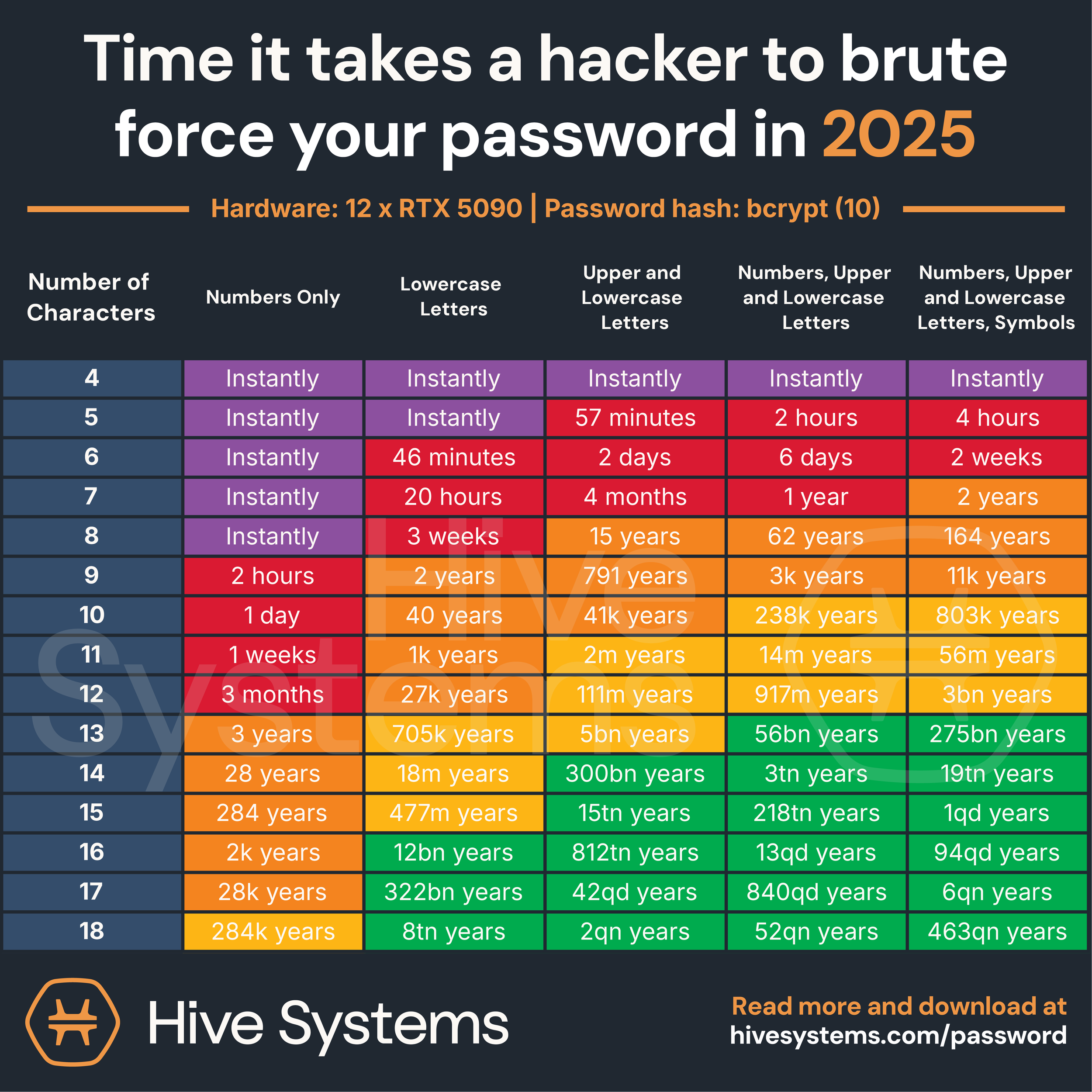
Brute force tries every possible password until it finds the right one. It can take time but works if passwords are short or simple. Hackers use software to speed up guessing millions of combinations quickly. Strong, long passwords stop this attack.
Keylogging Methods
Keyloggers record every key you press on your keyboard. Malware or hardware tools capture your password as you type. This method steals passwords without guessing. It can happen if your device is infected or physically compromised.
Advanced Hacking Tactics
Advanced hacking tactics go beyond simple guesses or common tricks. Hackers use complex methods to uncover weak passwords. These techniques exploit technology and human behavior. Understanding these tactics helps protect sensitive information effectively.
Network Analyzers
Network analyzers capture data flowing through a network. Hackers use them to intercept passwords sent over unsecured connections. These tools reveal login details when users connect to public Wi-Fi. Secure websites use encryption to block this attack, but many still lack it.
Memory-scraping Malware
This malware sneaks into a computer’s memory to grab passwords. It searches for stored or recently typed credentials. Once found, it sends the data back to hackers silently. This method bypasses traditional defenses like antivirus software.
Social Engineering Tricks
Hackers manipulate people to reveal their passwords willingly. They may pretend to be trusted staff or send fake alerts. These tricks exploit trust and fear, making users share sensitive information. Training and awareness reduce the risk of falling for these scams.
Extortion And Coercion
Some hackers use threats to force victims into giving passwords. They may threaten to harm reputation or leak private data. This tactic targets individuals and businesses alike. Strong legal support and quick action are vital to counter this threat.
Sources Of Leaked Passwords
Hackers find weak passwords by using leaked password sources. These sources provide a large list of passwords that hackers test against many accounts. Knowing where these passwords come from helps understand the risks. It also shows how hackers gather information quickly and easily.
Data Breaches
Data breaches happen when hackers break into a company’s database. They steal user information, including passwords. Many companies store passwords in unsafe ways. This makes it easy for hackers to get them. Once leaked, these passwords spread on the internet. Hackers use these lists to try on other sites. This technique is called credential stuffing.
Third-party Service Breaches
Third-party services often store user data for other companies. If these services are hacked, passwords can leak. Users may not realize their data is at risk. Hackers collect passwords from these breaches. They combine them with other leaked data. This increases the chances of finding weak passwords. Many users reuse passwords across sites, which helps hackers.
Password Harvesting Tools
Password harvesting tools are software used by hackers. These tools gather passwords from different sources automatically. They scan the web, dark web, and databases for leaked passwords. Some tools also capture passwords typed on keyboards. Hackers use these tools to build large password collections. Then they test these passwords on many accounts. This speeds up their hacking attempts.
Credit: www.bbc.com
Tools To Detect Weak Passwords
Detecting weak passwords is crucial to prevent unauthorized access. Various tools help identify passwords that are easy to guess or crack. These tools analyze password strength and reveal vulnerabilities. They assist both individuals and organizations in improving security.
Weak Password Scanners
Weak password scanners check databases for simple or common passwords. They compare passwords against lists of known weak options. These scanners find passwords like “123456” or “password.” They help identify accounts that need stronger passwords quickly. Many scanners run automated tests to save time and effort.
Security Auditing Software
Security auditing software reviews entire systems for password weaknesses. It detects poor password policies and reused passwords. This software often integrates with networks to scan multiple accounts. It provides reports showing where password security fails. Organizations use it to enforce stronger password rules and protect sensitive data.
Password Strength Testers
Password strength testers evaluate passwords as users create them. They measure complexity based on length, character variety, and unpredictability. These testers give immediate feedback to encourage better passwords. They prevent weak passwords from being set in the first place. This tool is common on websites and apps requiring user registration.
Creating Strong Passwords
Creating strong passwords is essential to protect your online accounts. Weak passwords make it easy for hackers to break in. Strong passwords act as a solid barrier against attacks. They help keep your personal and financial information safe.
Choosing the right password is not difficult. Simple steps can make your passwords much stronger. Here are effective ways to create strong passwords that hackers cannot easily guess or crack.
Using Random Word Combinations
Combine three or more unrelated words to form a password. This method creates long passwords that are easy to remember. Random word combinations confuse hackers and password cracking tools. For example, “bluecarrotpiano” is stronger than “password123”.
Avoiding Common Patterns
Do not use simple sequences like “12345” or “abcdef”. Avoid repeated letters or numbers such as “aaa111”. Common patterns are the first targets for hackers. Skip predictable phrases and keyboard paths like “qwerty”.
Incorporating Complexity And Length
Mix uppercase letters, lowercase letters, numbers, and symbols. Longer passwords are harder to crack. Aim for at least 12 characters or more. Complexity slows down brute force attacks and guessing attempts. For example, “T7r!s@L9mxP” is much stronger than “summer2023”.
Credit: nordpass.com
Protective Measures
Protective measures reduce the risk of hackers cracking your passwords. Simple steps can block many common attack methods. Staying cautious and proactive protects your personal and work accounts. Implementing strong defenses keeps your data safer.
Multi-factor Authentication
Multi-factor authentication adds extra steps to verify your identity. It requires more than just a password, such as a code from your phone. This makes it harder for hackers to access your accounts. Even if they steal your password, they cannot log in without the second factor.
Regular Password Updates
Changing passwords regularly limits the time hackers have to use stolen credentials. Updating passwords every few months reduces the chance of long-term damage. Choose new passwords that are strong and unique for each account. Avoid repeating old passwords to keep accounts secure.
Monitoring Online Exposure
Monitoring your online exposure helps detect if your passwords appear in data breaches. Use tools that alert you when your information leaks. Early detection lets you change passwords before hackers misuse them. Regular checks improve your overall online security.
Safe Browsing Habits
Safe browsing avoids risky websites and downloads that may contain malware. Avoid clicking on suspicious links or pop-ups in emails and websites. Use secure networks and keep your software updated. Good habits reduce chances of keyloggers and phishing attacks stealing passwords.
Recognizing And Responding To Threats
Recognizing and responding to threats is crucial to protect your accounts. Hackers use many tricks to find weak passwords. Knowing how to spot these threats helps you act fast. Early detection can stop damage and keep your data safe.
Spotting Phishing Attempts
Phishing is a common trick hackers use. They send fake emails or messages. These look real but ask for your password or personal info. Check the sender’s email carefully. Look for spelling mistakes or strange links. Never click links from unknown sources. Always verify before sharing your details.
Detecting Unusual Account Activity
Unusual activity can mean a hacker is inside your account. Watch for strange logins at odd times. Alerts about password changes you did not make. Unexpected emails sent from your address. Check your account settings regularly. Report any suspicious actions to your service provider.
Steps To Take After A Breach
After a breach, act quickly to limit damage. Change your passwords immediately. Use strong, unique passwords for each account. Enable two-factor authentication for extra security. Scan your device for malware or keyloggers. Inform your contacts if your email was compromised. Monitor your accounts closely for further issues.
Credit: www.hivesystems.com
Frequently Asked Questions
How Do Hackers Find Out Passwords?
Hackers find passwords using phishing, credential stuffing, brute force attacks, keylogging, and social engineering. They also exploit data breaches and weak password reuse.
Which Security Scanner Looks For Weak Passwords?
Weak Password Scanner by nFront Security identifies weak passwords by scanning systems for easily guessable credentials.
How Do Hackers Get Old Passwords?
Hackers get old passwords through data breaches, credential stuffing, phishing, keylogging, and social engineering tactics. They exploit reused or weak passwords to gain access.
What Is The 3 Word Password Rule?
The 3 word password rule creates strong passwords by combining three random, unrelated words. This makes passwords long, complex, and hard to guess or crack.
Conclusion
Hackers use many simple methods to find weak passwords. They guess, steal, or trick users to get access. Using common or short passwords makes it easier for them. Strong, unique passwords protect your accounts better. Changing passwords regularly adds extra safety.
Being aware helps you avoid common mistakes. Stay alert and keep your information safe always.