Have you ever wondered if someone can track you just by knowing your IP address? It’s a question that might make you pause every time you connect to the internet.
Your IP address is like your digital home address—it identifies your device on the web and can reveal more than you might expect. But how much can someone really find out? Can they pinpoint your exact location, or even access your private information?
You’ll discover the truth about what your IP address can reveal, the risks involved, and what simple steps you can take right now to protect your privacy. Keep reading—your online safety could depend on it.
Ip Address Basics
Understanding IP address basics helps you know what kind of information it reveals. Every device connected to the internet has an IP address. It acts like a digital address that tells other devices where to send data. This section explains what an IP address is, its types, and how it works online.
What Is An Ip Address?
An IP address is a unique set of numbers assigned to your device. It identifies your device on the internet or a local network. Think of it as your device’s home address for online communication. Without it, devices cannot find each other or exchange information.
Types Of Ip Addresses
There are two main types of IP addresses: IPv4 and IPv6. IPv4 uses four sets of numbers, like 192.168.1.1. IPv6 is newer and uses longer addresses to allow more devices. IP addresses can also be static or dynamic. Static addresses stay the same, while dynamic ones change over time.
How Ip Addresses Work Online
When you visit a website, your device sends its IP address to the server. The server uses this address to send data back to your device. This process allows websites to know where to deliver the requested information. Your IP can also show your general location and internet service provider.

Credit: www.keepersecurity.com
Location Tracking Potential
IP addresses hold some power in revealing your location online. They can show where your device connects to the internet. This information can help track your general area. However, the details they provide are often broad and not exact.
Understanding how much can be learned from your IP helps you stay cautious. Let’s explore the location tracking potential of an IP address.
Approximate Location From Ip
An IP address can point to a city or region, not a specific address. It often shows the area where your internet service provider (ISP) operates. This means someone can guess your general location, like the city or neighborhood. The accuracy depends on the IP database and the ISP’s setup.
Limitations Of Ip-based Tracking
IP tracking is not precise. It cannot reveal your home or exact street. Many users share the same IP in public networks or mobile internet. VPNs and proxies can hide your real IP. This makes location tracking from an IP less reliable.
Isp Information Revealed
Your IP address shows which ISP provides your internet connection. It reveals the company managing your network service. This does not include personal data like your name or phone number. Still, knowing your ISP can help narrow down your location area.
Risks Of Ip Exposure
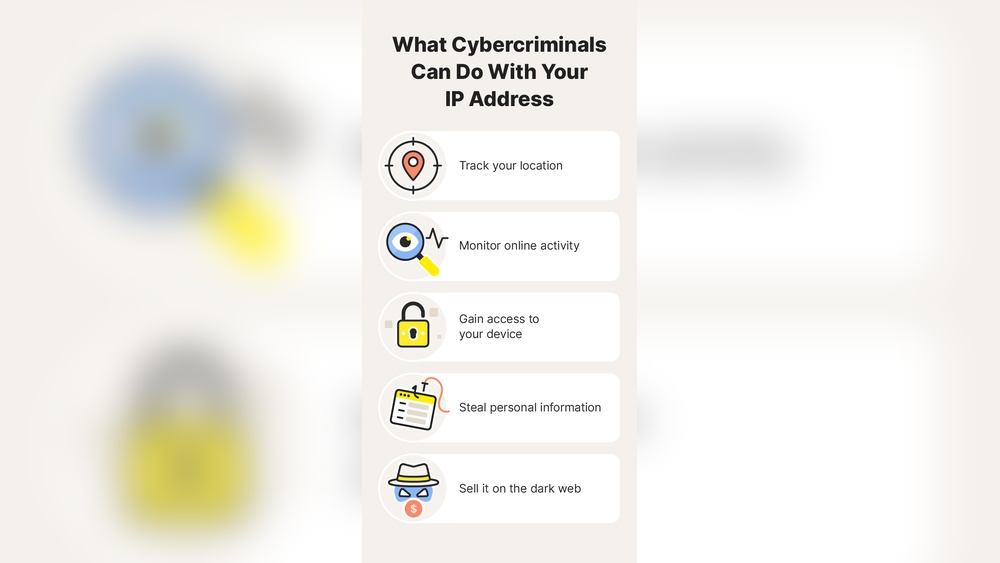
Exposing your IP address carries risks that affect your online safety. It reveals information about your internet connection and location. This exposure can lead to privacy issues and security threats.
Privacy Concerns
Your IP address can show your city or region. This allows others to guess your general location. Websites and advertisers use it to track your online habits. This tracking creates detailed profiles about your interests. Such data can be sold or misused without your knowledge.
Targeted Cyber Attacks
Hackers can use your IP address to plan attacks. They may try to access your devices or accounts. Some attacks overload your internet connection, causing outages. Others attempt to find weak points in your system. This can lead to identity theft or data loss.
Home Network Vulnerabilities
Your IP address links to your home network. Attackers can use it to find entry points. If your router or devices lack security, they become targets. This can allow unauthorized access to your files and cameras. Keeping your network secure is essential to prevent breaches.
Methods To Track Using Ip
Tracking someone using their IP address involves various techniques. These methods range from simple lookups to more complex hacking strategies. Understanding these methods helps users protect their privacy effectively.
Geolocation Databases
Geolocation databases link IP addresses to physical locations. They provide approximate city, region, and country details. These databases collect data from internet providers and public records. Companies and websites use this information to customize content. However, the location is not exact. It usually shows a general area, not a precise address.
Social Engineering Techniques
Social engineering tricks people into revealing personal information. Attackers may pretend to be trusted contacts or support staff. They use the IP address as a starting point to gain trust. Then, they ask for more details like location or device info. This method relies on human error rather than technology. It can be very effective if users are not careful.
Advanced Hacking Methods
Hackers use advanced tools to exploit IP addresses. They scan for open ports and vulnerabilities in devices. This can lead to unauthorized access to computers or networks. Some use malware to track online activities linked to the IP. These attacks require technical skills and resources. Protecting your IP and devices reduces these risks significantly.
Preventing Ip Tracking
Preventing IP tracking is essential for protecting your online privacy. Your IP address can reveal your approximate location and browsing habits. Taking simple steps can help mask your IP and keep your identity safe. Various tools and methods exist to block trackers from following your digital footsteps.
Using Vpn Services
A Virtual Private Network (VPN) hides your real IP address by routing your internet traffic through a remote server. This makes websites see the VPN’s IP, not yours. VPNs encrypt your data, adding a layer of security. Choose a reputable VPN with a strict no-logs policy. Avoid free VPNs as they may sell your data or have weak security. VPNs work well on all devices and protect you on public Wi-Fi networks.
Benefits Of Tor Browser
Tor Browser sends your internet traffic through several volunteer-run servers worldwide. This process hides your IP address and makes tracking very difficult. Tor is free and designed for strong privacy and anonymity. It works best for users needing extra protection from surveillance or censorship. Keep in mind Tor may slow down your connection due to multiple relays.
Proxy Servers Explained
Proxy servers act as intermediaries between your device and the internet. They mask your IP address by replacing it with their own. Proxies can be used to bypass geo-restrictions or browse anonymously. However, they usually lack encryption, so your data could be exposed. Use trusted proxy services and avoid free options to reduce risks. Proxies are useful but less secure than VPNs or Tor.
Switching To Mobile Data
Switching from Wi-Fi to mobile data changes your IP address. Mobile networks assign dynamic IPs that change frequently. This simple step can disrupt trackers relying on your home or office IP. It is especially useful for quick privacy boosts or avoiding location-based tracking. Use mobile data carefully as it may have data limits and cost more than Wi-Fi.

Credit: nordlayer.com
Additional Privacy Tips
Protecting your privacy online involves more than hiding your IP address. Small steps can add strong layers of security. These simple actions limit how much personal data websites and trackers collect. They help keep your browsing habits private and reduce the chance of being tracked.
Disabling Webrtc
WebRTC allows real-time communication in browsers but can leak your IP address. Disabling it stops this leak. Most browsers let you turn off WebRTC through settings or privacy extensions. This step helps keep your true IP hidden from websites and apps.
Using Privacy Extensions
Privacy extensions block trackers, ads, and scripts that follow you online. Popular tools include ad blockers and anti-tracking plugins. These extensions reduce data collection and improve browsing speed. Choose extensions from trusted sources to avoid security risks.
Clearing Cookies And Cache
Cookies and cache store website data on your device. They can track your activity over time. Regularly clearing them removes stored information that trackers use. This practice stops long-term tracking and frees up space on your device.
Adjusting Browser Settings
Most browsers offer privacy settings to control data sharing. You can block third-party cookies, disable location access, and manage permissions. Setting your browser to “Do Not Track” sends a request to websites not to track you. These settings improve privacy without extra tools.
Common Myths About Ip Tracking
Many people believe tracking someone through their IP address is simple and precise. This leads to several myths about what IP tracking can really do. Understanding these myths helps clarify what information your IP address can and cannot reveal.
Knowing the truth protects you from unnecessary fear and helps you use the internet more safely.
Incognito Mode Misconceptions
Incognito mode hides your browsing history from other users on the same device. It does not hide your IP address from websites or your internet provider. Websites can still see your IP and track your visits. Incognito mode only prevents saving history and cookies locally.
Free Vpn Risks
Free VPNs often promise privacy but can be risky. They may log your data or sell it to advertisers. Some free VPNs have weak security and can leak your real IP address. Using a trusted paid VPN is safer for protecting your identity online.
What Ip Can’t Reveal
An IP address shows only your approximate location, usually the city or region. It cannot reveal your exact home address, name, or phone number. IP tracking cannot access your personal files or conversations. It mainly identifies your internet connection, not your detailed identity.
Credit: www.hotspotshield.com
Frequently Asked Questions
Can Someone Track My Location Through My Ip Address?
Yes, someone can track your approximate location through your IP address. It reveals your city, ZIP code, and ISP, but not exact details. Skilled hackers might use this information to target your network, so protect your IP with a VPN or similar tools to enhance privacy and security.
Can Someone Find You If They Have Your Ip Address?
Someone with your IP address can estimate your general location and ISP but cannot find your exact address or personal details. Skilled hackers might exploit this data to target your network. Using a VPN or privacy tools helps protect your IP and online identity from tracking.
How Do I Stop My Ip Address From Being Tracked?
Use a reliable VPN to mask your IP by routing traffic through remote servers. Alternatively, use the Tor browser or a proxy server. Disable WebRTC, clear cookies, and adjust browser privacy settings to enhance protection. Avoid free VPNs for better security and privacy.
What Information Can You Get From An Ip Address?
An IP address reveals your approximate location, ISP name, and connection type. It helps identify your device online and track browsing activity.
Conclusion
An IP address can show your general location and internet provider. Skilled people might use this info to track your online activity. They cannot see personal details like your name or phone number through the IP alone. Using tools like VPNs or the Tor browser helps protect your privacy.
These tools hide your real IP and make tracking much harder. Staying aware and using privacy tools keeps your online presence safer. Remember, simple steps can reduce risks and protect your identity effectively.