Are you struggling to keep your virtual meetings effective and your remote team productive? You’re not alone.
Many people find it hard to stay focused and connected when working from different places. But what if you could turn those scattered online sessions into powerful, engaging experiences that get results? This article will show you simple yet powerful best practices to make your virtual meetings smoother and boost your team’s productivity.
Keep reading to discover how small changes can lead to big improvements in your remote work life.
Setting Up Effective Virtual Meetings
Setting up effective virtual meetings is key to keeping remote teams productive. Clear communication and smooth technology use help meetings run well. Good preparation saves time and reduces confusion. This section explores three important steps to set up great virtual meetings.
Choosing The Right Tools
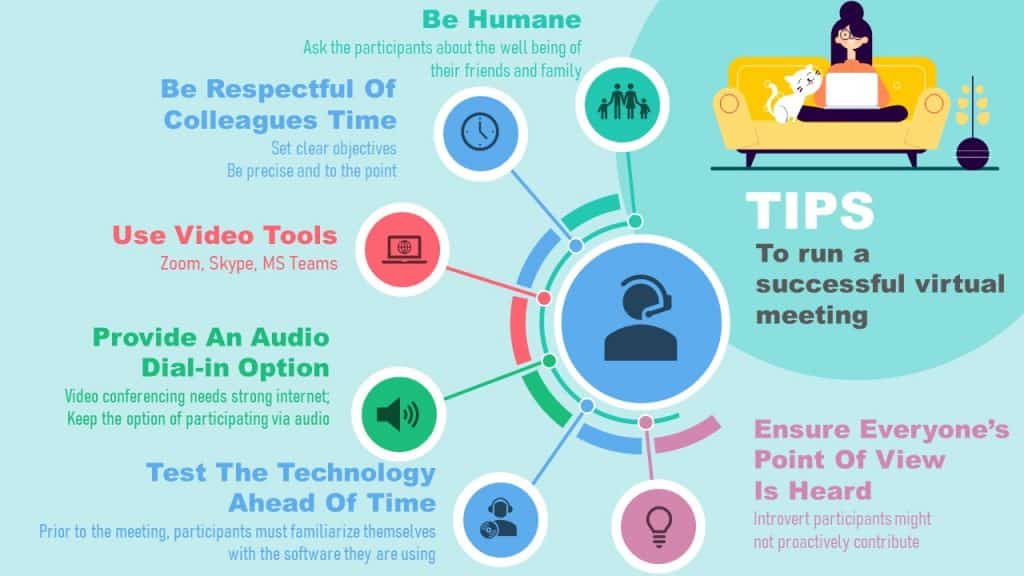
Select tools that match your team’s needs. Video conferencing apps like Zoom or Microsoft Teams work well. Ensure the tool supports screen sharing and recording. Test the software before meetings to avoid delays. Choose tools that are easy for everyone to use.
Scheduling For Different Time Zones
Remote teams often work across many time zones. Pick meeting times that suit most team members. Use scheduling tools like World Time Buddy to check overlaps. Rotate meeting times to share convenience fairly. Send calendar invites with clear time zone info.
Creating Clear Agendas
Agendas keep meetings focused and efficient. List topics and time limits for each item. Share the agenda before the meeting starts. Encourage team members to prepare questions or updates. Stick to the agenda to respect everyone’s time.
Engaging Participants
Engaging participants is key to successful virtual meetings. Without good engagement, meetings become dull and unproductive. Keeping everyone involved helps teams stay focused and work better together. It also makes remote work less lonely and more connected.
Encouraging Active Participation
Start meetings by inviting everyone to share their thoughts. Ask simple questions to get people talking. Give each person a chance to speak. Use round-robin style or direct questions. Keep the tone friendly and open. Active participation helps ideas flow and keeps energy high.
Using Interactive Features
Use chat boxes, polls, and breakout rooms during meetings. These tools make sessions lively and fun. They allow people to share ideas without interrupting. Polls show quick opinions and guide decisions. Breakout rooms enable small group discussions. Interactive features keep attention and boost teamwork.
Managing Meeting Etiquette
Set clear rules for behavior at the start. Ask participants to mute when not speaking. Encourage using video to create a personal feel. Remind everyone to avoid multitasking. Respect time by starting and ending meetings on time. Good etiquette keeps meetings smooth and respectful.
Optimizing Communication
Optimizing communication is key for virtual meetings and remote team work. Clear and smooth communication helps teams stay connected and productive. It reduces confusion and speeds up decision-making. Remote teams need to use the right methods to share information effectively.
Ensuring Clear And Concise Messaging
Keep messages simple and to the point. Avoid long sentences that confuse readers. Use bullet points to highlight important details. Speak slowly and clearly during video calls. Repeat key information to make sure everyone understands. Clear messaging saves time and reduces errors.
Balancing Synchronous And Asynchronous Communication
Use live meetings for urgent discussions and quick feedback. Rely on emails or chat apps for updates and non-urgent questions. This balance helps avoid meeting fatigue. It gives team members time to think and respond. Choose the right mode based on the message’s importance and timing.
Handling Technical Issues Smoothly
Prepare before meetings by testing your devices and internet. Have a backup plan if technology fails. Use simple language to explain problems without creating panic. Encourage team members to report issues quickly. Fix technical problems fast to keep meetings on track.

Credit: www.superstaff.com
Enhancing Remote Team Productivity
Enhancing remote team productivity is key to successful virtual meetings. Clear focus and strong communication help teams work well from different locations. Simple strategies make work easier and improve results.
Productivity grows with clear goals, good progress tracking, and balanced work habits. These practices help teams stay motivated and organized every day.
Setting Measurable Goals
Set clear and simple goals for every team member. Goals should be easy to understand and track. When goals are measurable, teams know what to do next. This keeps everyone focused on important tasks. It helps avoid confusion and wasted time.
Tracking Progress And Accountability
Track each task’s progress regularly. Use tools that show who is responsible for what. This keeps everyone accountable for their work. Progress updates help catch problems early. Teams can adjust plans and meet deadlines better.
Promoting Work-life Balance
Encourage breaks and respect personal time. Overworking lowers energy and focus. Balanced work hours help team members stay healthy and happy. This leads to better work quality and less burnout. A rested team works smarter and faster.
Fostering Team Collaboration
Fostering team collaboration is key to remote work success. Teams that work well together stay productive and motivated. Building strong bonds and clear communication helps remote members feel connected. This section explores practical ways to boost teamwork and collaboration in virtual meetings.
Building Trust Remotely
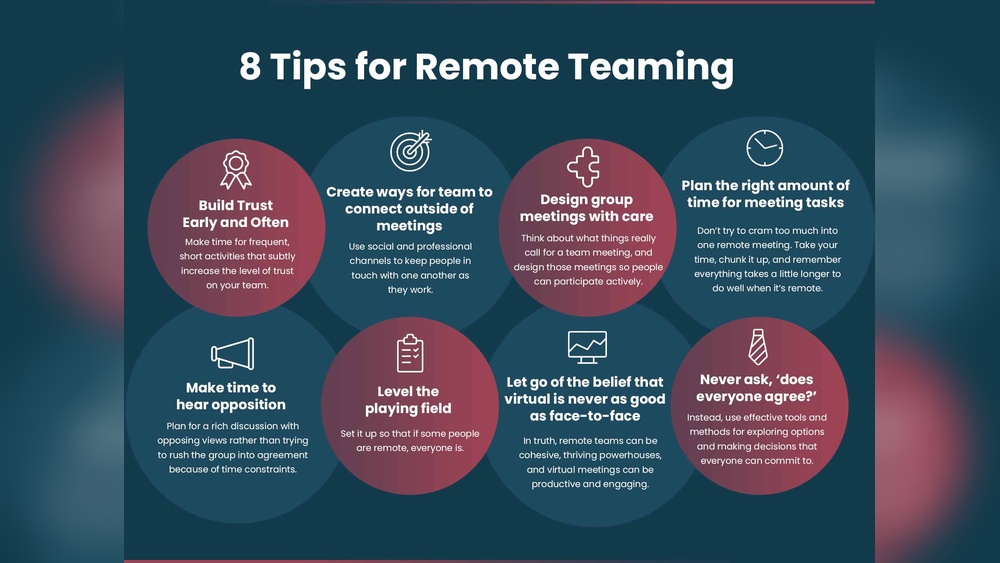
Trust forms the base of any good team. Remote workers need clear and honest communication. Share updates regularly and be open about challenges. Show respect for each team member’s time and input. Trust grows when everyone feels heard and valued. Small actions like timely responses build confidence. Teams that trust each other solve problems faster.
Using Collaborative Platforms
Choose tools that help teams work together easily. Platforms like shared documents, chat apps, and project boards keep tasks visible. These tools reduce confusion and keep projects on track. Make sure everyone knows how to use the tools well. Regular training and support improve team efficiency. Collaboration platforms create a shared workspace for all members.
Encouraging Social Interaction
Social time helps team members bond beyond work tasks. Short virtual coffee breaks or casual chats boost morale. Celebrate birthdays or achievements with small online gatherings. These moments create friendly connections and reduce isolation. Social interaction builds a positive team culture. Happy teams communicate better and stay engaged.
Credit: slideuplift.com
Improving Meeting Follow-up
Improving meeting follow-up is key to better remote team productivity. Clear follow-up actions help keep everyone on the same page. They prevent confusion and wasted time. Follow-up also ensures that decisions turn into results. Here are ways to improve your meeting follow-up.
Documenting Key Decisions
Write down all important decisions made during the meeting. Use simple and clear language. Share the notes with all team members quickly. This helps everyone remember what was agreed upon. It also serves as a reference for future discussions.
Assigning Action Items
Give specific tasks to team members right after the meeting. Make sure each task has a clear owner and deadline. This makes people responsible for their work. It keeps projects moving forward without delay.
Scheduling Regular Check-ins
Set up brief follow-up meetings to track progress. These check-ins keep the team focused on goals. They allow quick problem-solving and updates. Regular contact boosts team motivation and accountability.

Credit: white-rhino.co.uk
Frequently Asked Questions
What Are The Key Tips For Effective Virtual Meetings?
Effective virtual meetings require clear agendas, punctuality, and active participation. Use reliable technology and encourage concise communication to keep meetings productive and engaging.
How Can Remote Teams Stay Productive During Virtual Meetings?
Remote teams stay productive by minimizing distractions, setting clear goals, and using collaboration tools. Regular check-ins and defined action items help maintain focus and accountability.
What Tools Improve Virtual Meeting Experiences?
Tools like Zoom, Microsoft Teams, and Slack enhance virtual meetings with video, chat, and file sharing. Integrating scheduling and task management apps boosts team collaboration and efficiency.
How To Handle Time Zone Differences In Remote Teams?
Schedule meetings at overlapping work hours and use shared calendars. Communicate deadlines clearly and rotate meeting times to accommodate all team members fairly.
Conclusion
Effective virtual meetings boost team focus and save time. Clear goals keep discussions on track. Use video and chat tools to stay connected. Encourage everyone to share ideas freely. Set a regular meeting schedule to build routine. Short, focused sessions help maintain energy.
Good communication leads to better teamwork and results. Practice these habits to improve remote work success. Small changes make a big difference in productivity. Keep learning and adapting for smoother virtual meetings.