

Have you ever wondered how your devices on a network are identified beyond just their IP addresses? That’s where something called an OUI lookup comes into play.
If you want to know exactly who made a particular piece of hardware connected to your network, an OUI lookup can give you that answer quickly and easily. Understanding what an OUI is and how to use an OUI lookup tool can help you take control of your network, enhance security, and even troubleshoot issues faster.
Ready to uncover the hidden details behind those mysterious device codes? Let’s dive into what an OUI lookup is and why it matters to you.
What Is Oui
The term OUI stands for Organizationally Unique Identifier. It is a crucial part of networking technology. OUI helps identify the manufacturer of a device. This identification is important for managing and securing networks. Each OUI is unique and assigned to a specific company.
Understanding OUI involves knowing how devices connect and communicate. The OUI is embedded within a device’s MAC address. This small piece of information tells a lot about the device’s origin and maker.
Basics Of Mac Addresses
A MAC address is a unique code assigned to every network device. It acts like a digital fingerprint. This address allows devices to communicate on a local network. It is made up of six groups of two hexadecimal digits. The first part of the MAC address is the OUI.
Role Of Oui In Mac
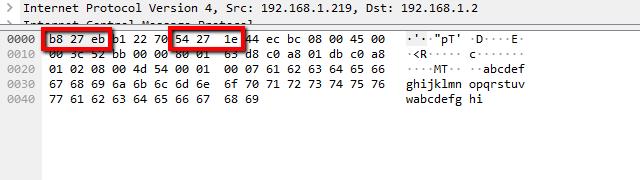
The OUI forms the first 24 bits of a MAC address. It identifies the device’s manufacturer. The remaining bits specify the individual device. This helps ensure each MAC address is unique worldwide. Networks use this system to track and control devices.
How Oui Identifies Vendors
Each vendor registers their OUI with a central authority. This registration prevents duplication of identifiers. When a MAC address is read, the OUI reveals the device maker. This helps in troubleshooting and network management. It also supports security by identifying unknown devices.
Credit: www.techtarget.com
How Oui Lookup Works
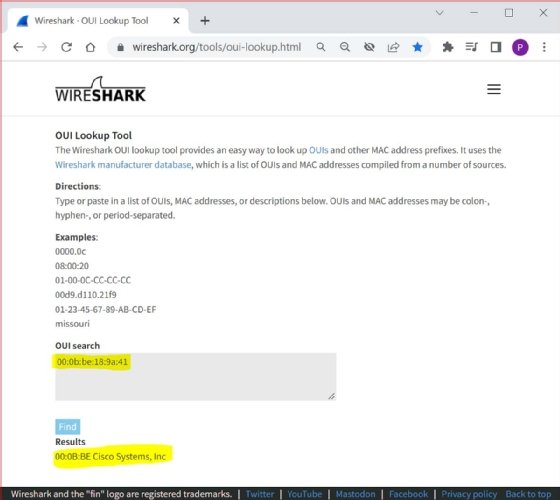
Understanding how OUI lookup works helps identify device manufacturers from MAC addresses. Each device connected to a network has a unique MAC address. The first part of this address is the Organizationally Unique Identifier (OUI). This OUI reveals the maker of the device. By checking the OUI against a database, you can find the vendor name. This process aids in network management and security tasks.
Accessing Oui Databases
OUI databases store information about registered manufacturers. These databases are maintained by official organizations like IEEE. Many websites offer free access to these databases. Users can search by entering the OUI or full MAC address. The database returns details about the registered company. Some databases update regularly to include new vendors.
Interpreting Lookup Results
Lookup results show the vendor name linked to the OUI. The results may include the company’s address and contact info. Some tools provide additional data like device type or registration date. This information helps verify device authenticity. It also assists in tracking network devices accurately.
Common Lookup Tools
Several tools exist for performing OUI lookups. Online platforms allow quick searches without installation. Software like Wireshark includes built-in OUI lookup features. Mobile apps also provide convenient access to OUI databases. These tools vary in features but share the same goal: identifying device manufacturers easily.
Popular Oui Lookup Tools
Popular OUI lookup tools help identify device manufacturers quickly. These tools analyze the first part of a MAC address, known as the Organizationally Unique Identifier (OUI). Users can match OUIs to vendors, which is useful for network troubleshooting and security. Various tools exist, each serving different user needs and technical skills.
Wireshark Oui Lookup
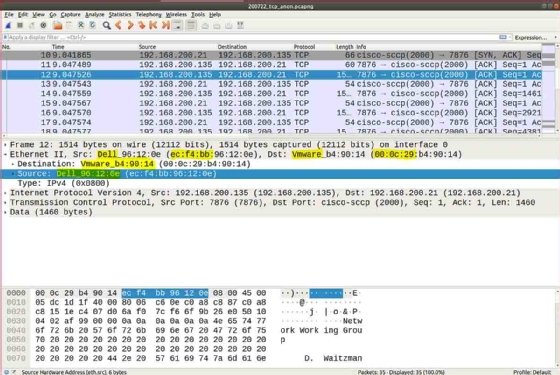
Wireshark is a famous network analyzer. It includes a built-in OUI lookup feature. This tool automatically resolves OUIs during packet analysis. Users see the vendor names linked to MAC addresses easily. It helps network experts spot devices and detect anomalies fast.
Online Vendor Search Engines
Many websites offer free OUI lookup services. Users enter an OUI or full MAC address to find vendor details. These platforms update their databases regularly from official IEEE records. They are simple to use and accessible from any device with internet.
Command-line Utilities
Command-line tools provide fast OUI lookups for tech-savvy users. Utilities like “arp” or dedicated scripts query local or online OUI databases. These tools are perfect for automation and scripting in network management. They work well in environments without graphical interfaces.
Credit: www.techtarget.com
Applications Of Oui Lookup
OUI Lookup has several important uses in managing and securing networks. This tool helps identify device manufacturers by decoding the first part of a MAC address. It proves valuable in various areas like network security, device tracking, and fixing connection problems. Understanding these applications helps both beginners and professionals handle networks better and safer.
Network Security And Monitoring
OUI Lookup helps spot unknown devices on a network. It shows the manufacturer behind each MAC address. This helps detect unauthorized or suspicious devices. Network admins use this info to block or allow devices. It also helps watch traffic from certain vendors. This makes networks safer and easier to control.
Device Identification
Each device has a unique MAC address starting with an OUI. This identifies the device maker quickly. OUI Lookup reveals the company name behind a device. This helps know what devices connect to your network. It is useful in large offices or public Wi-Fi. You can track and manage devices easily by their manufacturer.
Troubleshooting Network Issues
OUI Lookup aids in finding problem devices. If a device causes issues, knowing its maker helps find solutions. Different vendors have unique hardware features. Troubleshooting steps vary by manufacturer. Identifying devices speeds up fixing connection or compatibility problems. It also helps verify device authenticity during repairs.
Updating And Maintaining Oui Data
Updating and maintaining OUI data is essential for accurate device identification. The OUI database evolves as new vendors register and existing entries change. Staying current ensures reliable lookups and network analysis.
Ieee Oui Database Updates
The IEEE manages the official OUI database. It releases updates regularly to include new vendor assignments. These updates fix errors and add fresh data. Network tools rely on the latest IEEE records to function correctly.
Vendor Registration Process
Vendors register their unique OUI blocks with the IEEE. This process involves submitting company details and paying fees. Approved vendors receive official identifiers. This system prevents duplication and keeps the database organized.
Keeping Tools Current
Tools that perform OUI lookup must update their data frequently. Many software solutions fetch IEEE updates automatically. Manual updates are also common in offline tools. Regular updates improve accuracy and avoid misidentification.
Credit: www.comparitech.com
Challenges And Limitations
Using Oui Lookup helps identify device manufacturers by their MAC addresses. Despite its usefulness, some challenges and limits affect its accuracy and efficiency. These issues can impact network management and security tasks.
Incomplete Vendor Data
Oui Lookup databases may not have all vendor information. Some manufacturers do not register their MAC address blocks. This leads to missing or outdated data. Users might see unknown or incorrect vendor names. Keeping the database updated is a constant challenge.
Mac Address Spoofing
MAC addresses can be easily changed or spoofed. Attackers or users may fake MAC addresses to hide their identity. Oui Lookup then shows false vendor information. This limits the tool’s ability to confirm a device’s real origin. Spoofing reduces trust in MAC-based identification.
Handling Large Networks
Large networks generate thousands of MAC addresses daily. Processing all addresses with Oui Lookup can be slow and resource-heavy. Real-time monitoring becomes difficult. Network administrators need efficient tools to manage this volume. Scaling Oui Lookup for big environments remains a key issue.
Future Trends In Oui Lookup
The future of OUI lookup shows promising advancements. These changes will improve how devices and vendors are identified. The growth in technology demands smarter, faster, and more accurate OUI lookup tools. This section explores key trends shaping the future of OUI lookup.
Integration With Ai And Automation
AI will play a bigger role in OUI lookup systems. Automation can speed up the process of identifying devices. It will help detect new patterns in MAC addresses quickly. AI will reduce human errors and improve efficiency. This means faster responses in network security and management.
Enhanced Database Accuracy
Databases will become more accurate and reliable. Updates will happen more often to keep data current. Errors and duplicates will be minimized through better verification methods. This leads to more trustworthy information for users. Accurate data is crucial for effective device identification.
Expanding Vendor Information
Vendor details will become more detailed and comprehensive. Additional information like device types and models may be included. This helps users understand devices better and make informed decisions. More vendor data supports various industries, including cybersecurity and IT management. The OUI lookup will offer richer insights into connected devices.
Frequently Asked Questions
What Is An Oui Lookup?
An OUI lookup identifies a device manufacturer using the first three bytes of its MAC address. It helps track hardware vendors quickly.
What Is The Oui Database?
The OUI database lists Organizationally Unique Identifiers assigned to device manufacturers. It helps identify hardware vendors by MAC addresses.
What Is Oui Used For?
OUI identifies a device manufacturer by the first part of a MAC address. It helps network admins track hardware vendors quickly.
What Is Apple’s Oui?
Apple’s OUI (Organizationally Unique Identifier) is a unique 24-bit prefix in MAC addresses. It identifies Apple devices’ network hardware manufacturers.
Conclusion
Oui Lookup helps identify device manufacturers using MAC addresses. It reveals who made a network device. This is useful for network management and security checks. Knowing the manufacturer can help track devices on a network. It also aids in troubleshooting connection issues.
Anyone working with networks can benefit from using Oui Lookup. The tool is simple and quick to use. Understanding Oui Lookup adds value to managing technology devices. Keep this tool in mind for your network tasks.






