

Have you ever wondered just how much Google knows about you? From the moment you search for something, watch a video, or even use your voice to ask a question, Google is quietly collecting a surprising amount of information.
This data isn’t just random—it helps shape the ads you see, the recommendations you get, and even the way Google’s services work for you. But do you really know what’s being gathered, why it’s collected, and how much control you actually have over it?
Keep reading, because uncovering the full picture of what Google knows about you can empower you to take charge of your digital privacy like never before.

Credit: cubecreative.design
Data Google Collects
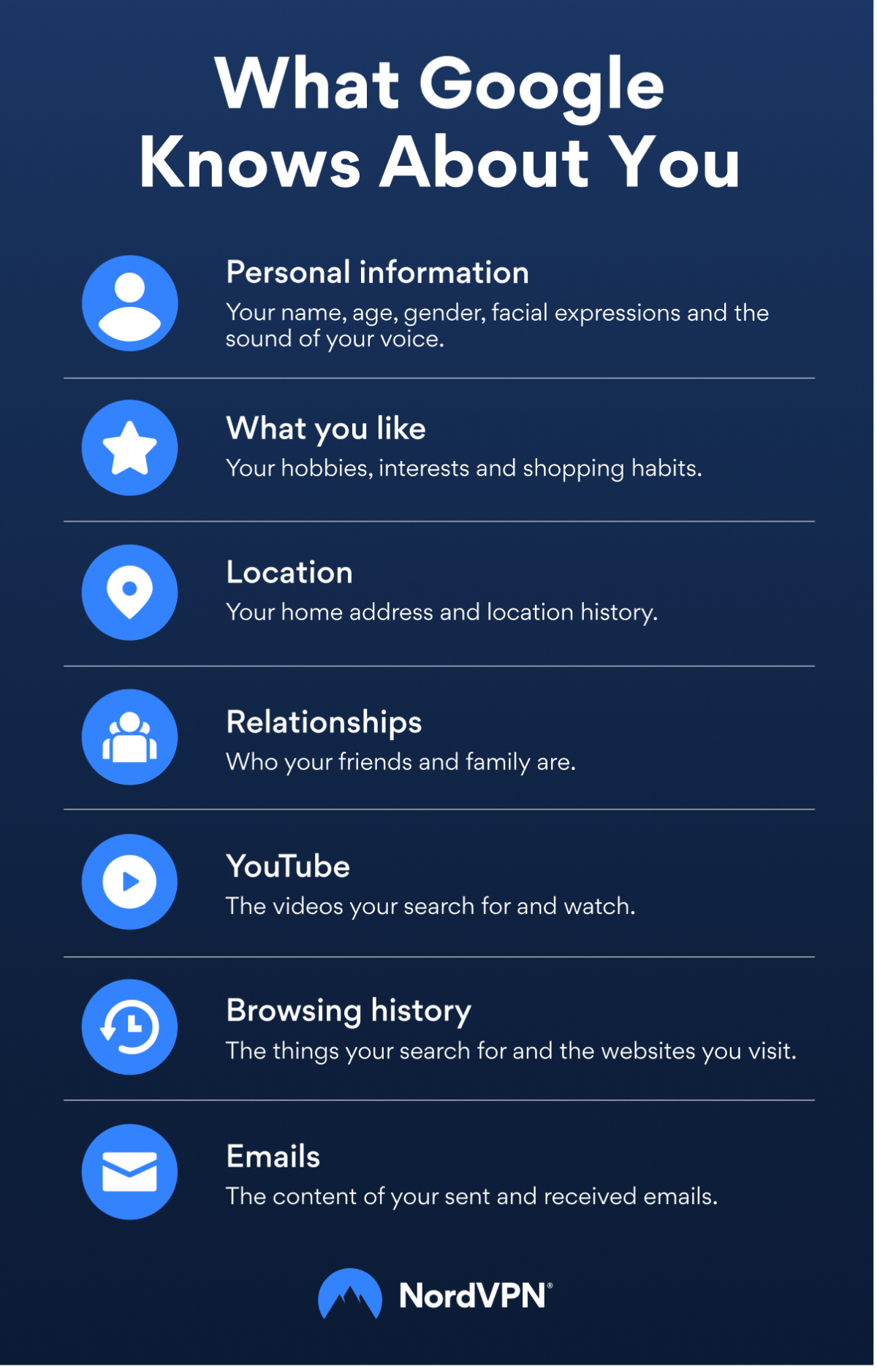
Google gathers various types of data to improve its services and customize user experience. This data comes from your interactions with Google products and devices. Understanding what Google collects helps you manage your privacy better.
Personal Information
Google stores basic personal details like your name, email, and phone number. It also collects your birthday, gender, and sometimes work information. Family and friends’ locations may be noted if shared with you.
Activity Records
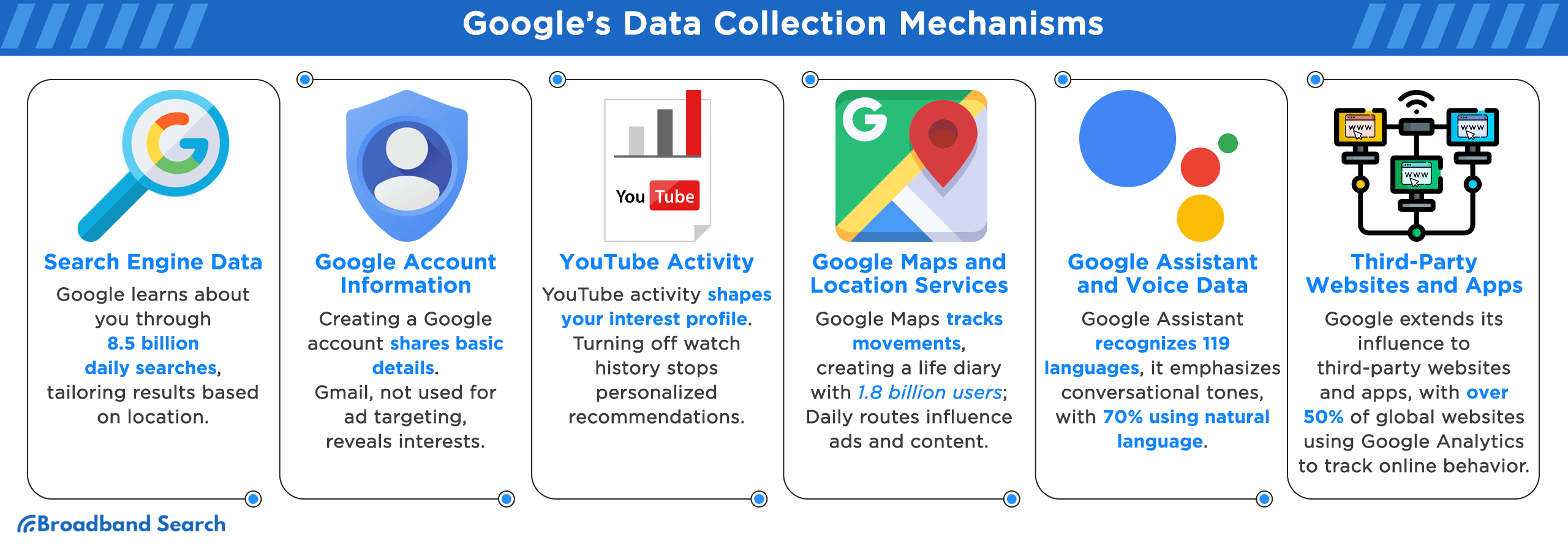
Every search you make is recorded. Google tracks websites you visit using Chrome. It logs videos you watch on YouTube and ads you click. Voice commands to Google Assistant and physical activity from Maps are also saved.
Location Data
Google records your real-time location through Maps and device sensors. Historical location data shows where you have been over time. This helps Google offer relevant local content and directions.
Device Details
Information about your device is collected, including IP address, device type, and operating system. Cookies and similar technologies track your device activity for better service delivery.
Content Stored
Google stores emails from Gmail and photos you upload. Calendar events and saved passwords via Chrome are also kept. This content is linked to your Google Account for easy access.
Reasons For Data Collection
Google collects data for several important reasons. Understanding why helps you see how your information is used. Data collection supports better services and user experiences. It also allows Google to offer free services through ads. Below are the main reasons Google collects your data.
Personalized Experiences
Google uses your data to tailor services to your needs. It shows search results based on your interests. YouTube recommends videos you may like. Maps suggests routes based on your travel habits. Personalization makes using Google smoother and more useful.
Ad Targeting
Google shows ads that match your preferences and behavior. Data about your searches and views helps target ads. This means ads are more relevant to you. Targeted ads help Google earn money to keep services free. Ads based on your data reduce irrelevant ads you see.
Service Enhancements
Google studies your data to improve its apps and services. It finds bugs and fixes them faster. Usage data helps add new features that users want. Google also learns how to make services faster and safer. Service improvements benefit all users by enhancing quality.
Accessing Your Google Data
Accessing your Google data lets you see what the company knows about you. Google collects information from many services you use daily. This includes your searches, videos watched, locations visited, and more. You have tools that help you review and manage this data. These tools keep your data transparent and under your control.
Google Account Dashboard
The Google Account Dashboard shows a summary of your data. It displays information from services like Gmail, YouTube, and Maps. You can see your recent activity and personal details here. The dashboard also lets you control what data Google saves. It is the first place to check your data footprint.
Ad Profile And Interests
Google creates an ad profile based on your activity. This profile lists your interests and preferences. It helps Google show ads that match your tastes. You can view and edit your interests anytime. Adjusting these can change the ads you see on Google services.
Activity Controls
Activity controls let you choose what Google tracks. You can turn on or off options like Web & App Activity. Location History and YouTube History are also managed here. Pausing these limits data collection. You can also delete past activities from this section.
Credit: nordvpn.com
Managing Your Data Settings
Managing your data settings is essential to protect your privacy on Google. It gives you control over what information Google collects and stores about you. Adjusting these settings can limit data sharing and customize your online experience. Below are key ways to manage your data effectively.
Adjusting Privacy Controls
Google provides privacy controls to help you manage your data. You can review and change what data Google collects from your activities. Visit your Google Account’s privacy section to adjust these settings. Turn off Web & App Activity to stop saving your searches and browsing history. You can also pause Location History to prevent tracking of your movements. These controls help keep your data private and reduce data collection.
Limiting Data Storage
Google stores your data unless you delete it. You can set up automatic deletion for your activity data. Choose to delete data older than 3, 18, or 36 months from your account. This keeps your stored data limited and reduces your digital footprint. You can also manually delete specific activities or entire categories like search history or YouTube watch history. Limiting stored data helps protect your privacy over time.
Controlling Ad Personalization
Google uses your data to personalize ads shown to you. You can control this by visiting the Ad Personalization settings. Turn off ad personalization to stop Google from tailoring ads based on your data. You will still see ads but they won’t be based on your interests or activity. You can also review and remove specific ad interests to change what ads you receive. Controlling ad settings gives you more privacy and less targeted advertising.
Stopping Google From Listening
Stopping Google from listening is important for privacy. Google records your voice and audio to improve services. This data is stored and can be used for ads or analysis. You can take steps to reduce or stop Google from listening to you. Managing these settings helps protect your privacy and control your data.
Disabling Voice And Audio Activity
Voice and Audio Activity saves your spoken commands and sounds. Disabling this stops Google from saving your voice recordings. Go to your Google Account settings. Find “Data & privacy” and then “Voice & Audio Activity.” Turn off the option to stop saving your audio data.
Turning Off Voice Commands
Voice commands let you control devices by speaking. Disabling voice commands stops Google Assistant from listening. Open the Google Assistant settings on your device. Find the “Hey Google” or voice activation option. Turn it off to prevent your device from reacting to voice commands.
Revoking Microphone Permissions
Google apps use your microphone to listen for commands. You can revoke microphone access to stop this. On your device, go to settings and then “Apps.” Choose Google or related apps. Find “Permissions” and turn off microphone access to block listening.
Deleting Saved Audio
Google saves your audio recordings in your account. You can delete these saved files anytime. Visit your Google Account and open “Data & privacy.” Select “My Activity” and filter by voice and audio. Choose recordings and delete them to remove saved audio data.
Downloading And Deleting Data
Downloading and deleting data lets you control what Google stores about you. It helps protect your privacy and manage your digital footprint. You can get a copy of your data or erase information you no longer want Google to keep.
This section explains how to export your information and remove data from Google easily. Follow the simple steps to handle your personal data with confidence.
Exporting Your Information
Google offers a tool called Google Takeout to download your data. It collects information from all Google services you use. You can choose which data to export, such as emails, contacts, photos, and more.
After selecting the data, Google prepares a file for download. This file can be saved on your device for backup or review. Exporting data helps you keep a personal record or move data to another service.
Removing Data From Google
Deleting data from Google is possible through your account settings. Visit the Data & privacy section to find options for deleting history and personal info. You can erase search history, location data, YouTube activity, and other records.
Some data removal is permanent, while other types may be recoverable for a short time. Regularly deleting data reduces Google’s knowledge about your habits and preferences. This step helps maintain privacy and control over your information.
Credit: www.broadbandsearch.net
Frequently Asked Questions
What Information Does Google Know About Me?
Google collects your personal info, search history, location, device data, emails, and voice commands from its services. It uses this data to personalize content, target ads, and improve services. You can view and control this information in your Google Account’s Data & privacy settings.
How Do I Stop Google From Listening To My Conversations?
Open your Google Account settings. Disable “Voice & Audio Activity” and “Web & App Activity. ” Also, mute or disable Google Assistant’s microphone. Regularly delete stored voice recordings to prevent Google from listening to your conversations.
What Data Does Google Collect About Their Users?
Google collects personal info, search history, location data, device details, emails, voice commands, and app activity. It uses this data to personalize services, target ads, and improve user experience. Users can view and manage their data in Google Account’s Data & Privacy settings.
Can I Trust Google 100%?
You cannot trust Google 100% because it collects extensive personal data. Use privacy settings to control and limit data sharing.
Conclusion
Google collects a lot of information about your online activities. This data helps tailor your experience and show relevant ads. You hold the power to manage what Google saves. Visit your Google Account settings to review and control your data.
Regular checks keep your information more private and secure. Stay aware of what Google knows to protect your digital privacy.






