
Have you ever noticed those little pop-ups asking you to accept cookies when you visit a website? You might wonder why websites track cookies and what that means for your online experience.
Understanding why cookies are used can help you take control of your privacy and make smarter choices while browsing. You’ll discover the real reasons behind cookie tracking—how it affects your convenience, security, and even the ads you see. By the end, you’ll know exactly why websites want your permission to use cookies and how it impacts you every time you surf the web.
Keep reading to unlock the secrets behind those cookie banners and why they matter to you.

Credit: www.cookieyes.com
Role Of Cookies On Websites
Cookies play a vital role in how websites function and serve users. They store small pieces of data to improve browsing experience. Without cookies, websites would not remember user preferences or login details.
Cookies help websites offer personalized content and keep users logged in across sessions. They also assist in tracking user behavior for analytics and marketing purposes. This data lets website owners understand visitor needs and improve their services.
Types Of Cookies
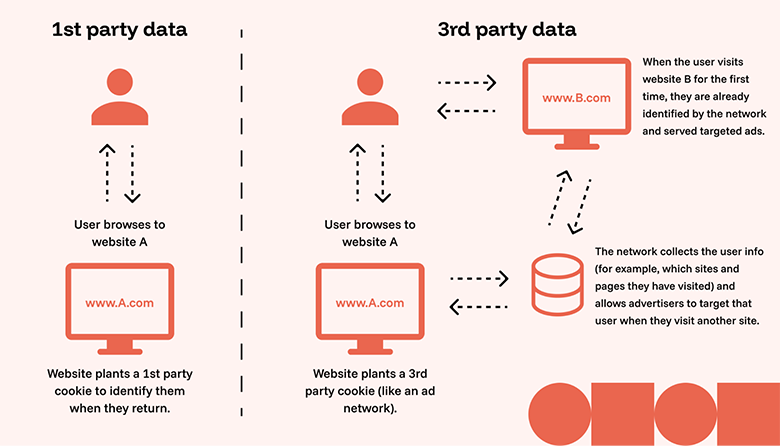
There are several types of cookies used by websites. First-party cookies come from the website you visit directly. They help remember settings like language and login information.
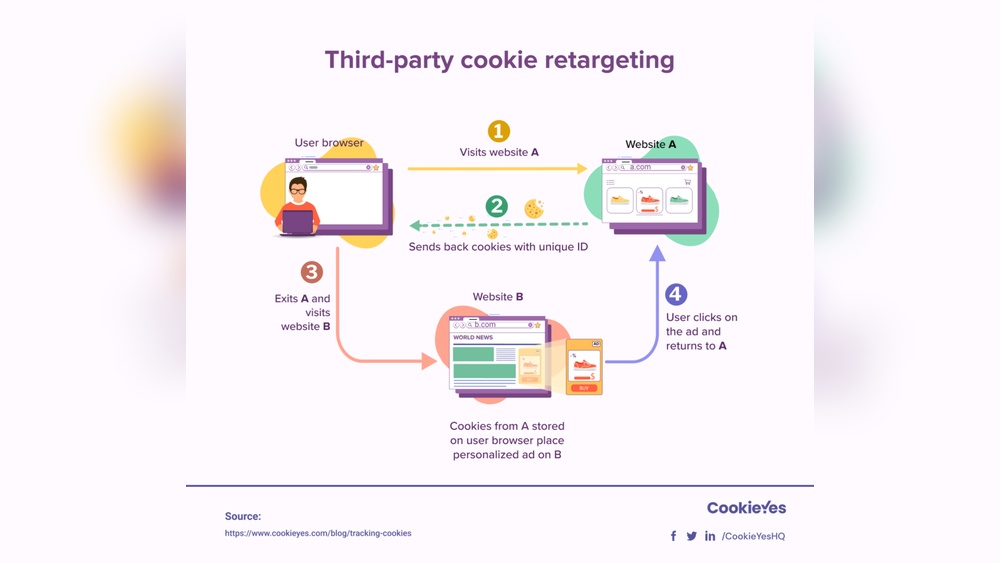
Third-party cookies belong to other domains, often used by advertisers to track users across multiple sites. These cookies build profiles to show relevant ads.
Session cookies last only while you browse and disappear when you close your browser. Persistent cookies stay on your device for a set time to keep preferences saved.
How Cookies Work
When you visit a website, it sends a cookie to your browser. Your browser stores this cookie and sends it back with each request to the same site.
This process lets the website recognize you and recall your preferences. For example, cookies keep you logged in or remember items in your shopping cart.
Cookies also collect data about your interactions. This data helps website owners improve user experience and target advertisements effectively.
Legal Reasons For Cookie Tracking
Websites track cookies not only to improve user experience but also to meet legal obligations. Laws around the world require websites to handle user data carefully. These laws ensure user privacy and control over personal information. Websites must follow strict rules to avoid penalties and build trust with visitors.
Gdpr And Cpra Compliance
The General Data Protection Regulation (GDPR) protects personal data of people in the European Union. It sets clear rules for how websites collect and use cookies. Websites must explain what data they collect and why. They must also secure user consent before placing tracking cookies.
The California Privacy Rights Act (CPRA) is a similar law in the United States. It gives California residents rights over their personal information. Businesses must allow users to opt out of data sharing. CPRA also requires transparency about cookie use and data processing.
Consent Requirements
Legal rules demand websites get user permission before tracking. Consent must be clear, informed, and freely given. Websites often show cookie banners asking visitors to accept or reject cookies. Users have the right to refuse non-essential cookies without losing site access.
Consent management tools help websites record and manage user choices. They keep a log of consent for legal proof. This process protects users and ensures websites follow the law. Respecting consent builds user confidence and improves website credibility.
Functional Benefits Of Cookies
Cookies provide essential functions that improve the user experience on websites. They help sites remember important details, making browsing smoother and faster. These small data files support various features that users expect when visiting a site. Below are some key functional benefits of cookies that many people rely on daily.
Remembering User Preferences
Cookies save your choices like language, font size, and theme. This means you don’t have to reset these options on every visit. The website adapts to your preferences automatically. It creates a more personalized and enjoyable experience.
Maintaining Shopping Carts And Logins
Cookies keep track of items in your shopping cart. Even if you leave the site, your cart stays saved. They also remember your login status so you don’t need to sign in repeatedly. This saves time and makes online shopping easier.
Enhancing Site Security
Cookies help websites detect suspicious activity. They can identify if someone is trying to access your account without permission. This adds an extra layer of protection for your personal information. Secure cookies ensure safer browsing and reduce fraud risks.
Cookies And Personalized Advertising
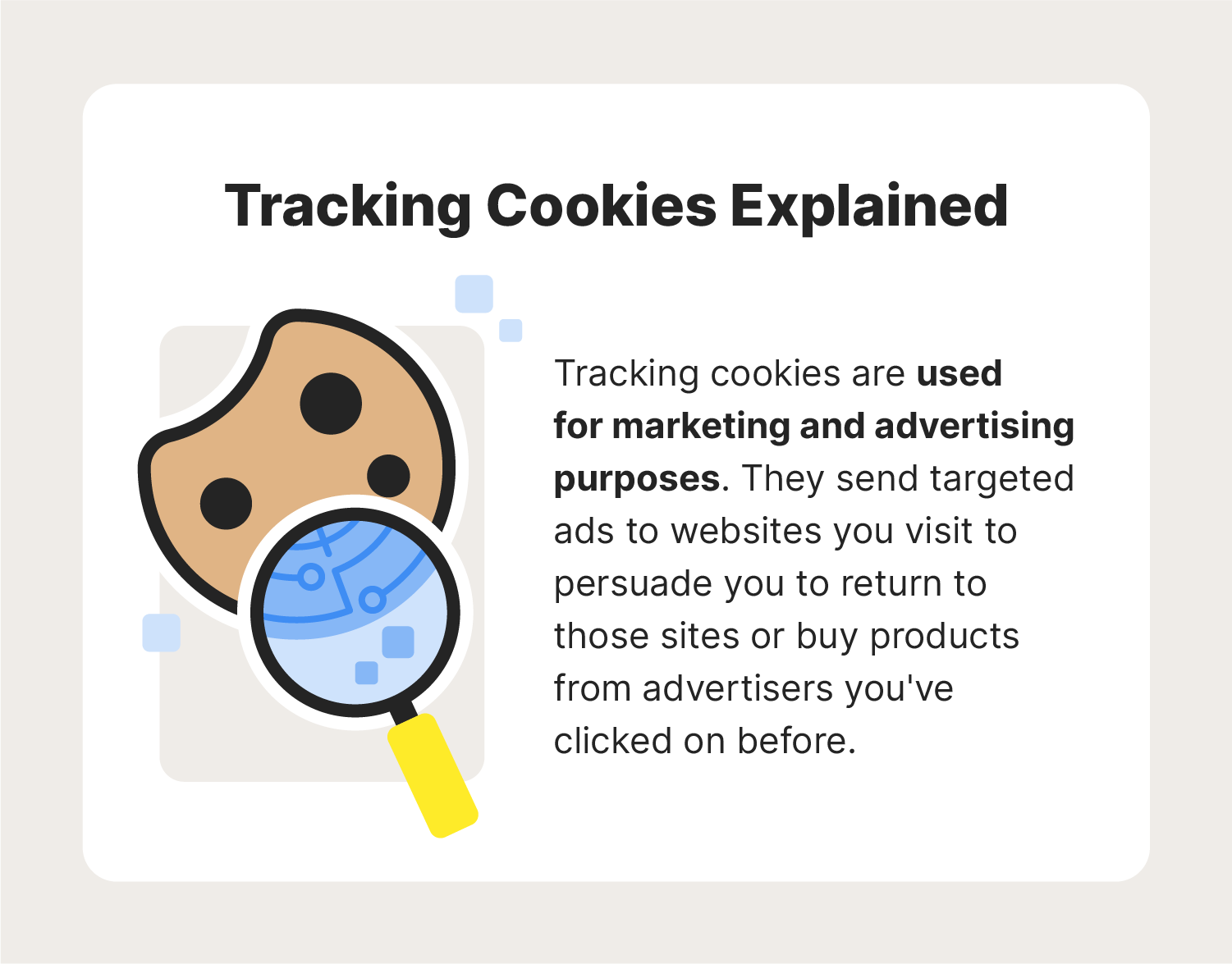
Cookies play a key role in personalized advertising on websites. They help collect data about user behavior and preferences. This data allows websites to tailor ads and content to each visitor. Personalized advertising improves user experience and helps websites connect with their audience more effectively.
Building User Profiles
Cookies gather information about user actions and interests. They track pages visited, time spent, and items clicked. This data creates a profile that reflects user preferences. Advertisers use these profiles to understand what users like. Profiles grow more accurate as cookies collect more data over time.
Targeted Content Delivery
Websites use cookies to show ads that match user interests. Instead of random ads, users see relevant products or services. Targeted ads increase the chance of user engagement. This method reduces irrelevant ads and improves browsing satisfaction. Content can also adjust to user needs based on cookie data.
Revenue Generation For Websites
Personalized ads generate more clicks and sales. Advertisers pay websites to display these targeted ads. Higher engagement means better revenue for site owners. Cookies make advertising more effective and profitable. This income helps websites offer free content and services to users.
Common Practices In Cookie Consent Banners
Cookie consent banners are now a standard feature on most websites. They inform users about cookie use and request permission. These banners follow common practices designed to influence user choices. Understanding these practices reveals how websites balance legal demands and business goals.
Design Of ‘accept All’ Buttons
Many cookie banners highlight the ‘Accept All’ button. It usually appears larger and in bright colors. This design draws attention and encourages quick acceptance. Sometimes, ‘Accept All’ is the easiest or only clear option. This approach leads more users to agree without reading details.
Business Motivations Behind Consent Requests
Websites use cookies to collect data for ads and marketing. Consent requests help businesses gain permission legally. More consents mean better data for targeted ads. This data boosts revenue by showing relevant ads to users. Consent banners also protect companies from legal penalties.
Challenges In Declining Cookies
Declining cookies often requires more clicks and effort. Some sites hide the decline option in small text or menus. This makes it harder for users to refuse tracking. The design nudges users toward accepting cookies instead. These challenges affect user control over privacy choices.
Impact Of Declining Cookies
The decline in cookie usage is reshaping how websites function and interact with users. Cookies help sites remember preferences, track behavior, and deliver personalized content. Without them, many features face limitations. This shift impacts user experience and website operations in clear ways.
Reduced Website Functionality
Cookies store important data like login status and shopping carts. Without cookies, users may need to log in repeatedly. Shopping carts might not save items between visits. Website navigation can become less smooth. Overall, the site feels less user-friendly.
Generic Ad Experiences
Cookies allow advertisers to show relevant ads based on user interests. With fewer cookies, ads become generic and less targeted. Users see unrelated promotions, reducing ad effectiveness. Advertisers lose valuable data to tailor messages. Websites may earn less from ad revenue.
Access Restrictions
Some websites restrict content if cookies are blocked. They rely on cookies to verify user identity or consent. Visitors may face pop-ups or denied access without cookie acceptance. This creates frustration and limits available information. Many sites insist on cookies to function properly.
Balancing User Experience And Data Collection
Balancing user experience with data collection is a key challenge for websites. Cookies help improve how users interact with sites by remembering preferences and login details. At the same time, websites gather data to analyze traffic and personalize content. This balance ensures smooth functionality while respecting user privacy and legal rules.
Technical Necessities
Cookies store information needed to keep websites working properly. They remember login status so users do not need to sign in repeatedly. Shopping carts use cookies to save selected items until checkout. Without cookies, many features would break or become inconvenient. These technical uses improve site speed and usability.
Legal Obligations
Privacy laws like GDPR and CCPA require websites to get permission before tracking users. Sites must inform visitors about cookie use and offer choices. This protects user rights and increases transparency. Legal rules force sites to show cookie banners and manage consent properly. Compliance avoids fines and builds trust with users.
Business Strategies
Cookies help websites collect data to understand visitor behavior and preferences. This data supports targeted advertising and personalized content. Businesses use cookies to increase engagement and sales. Tracking allows better marketing decisions and improves user retention. However, sites must balance data use with respecting privacy demands.
Credit: funnel.io
Credit: us.norton.com
Frequently Asked Questions
Should I Worry About Tracking Cookies?
Tracking cookies are not harmful but track browsing habits to personalize ads and improve site functionality. Manage cookie settings to protect privacy.
Why Do Websites Force You To Accept Cookies?
Websites force cookie acceptance to comply with laws like GDPR, ensure site functionality, and support personalized ads for revenue. Cookies remember logins, preferences, and shopping carts, improving user experience while allowing data collection for targeted marketing.
Should I Accept Cookies On Sites?
Accept cookies only from trusted sites to improve browsing convenience, like remembering logins or carts. Avoid unnecessary tracking cookies to protect privacy.
What Does It Mean When A Website Collects Cookies?
When a website collects cookies, it stores small data files on your device. These files remember your preferences, login details, and browsing activity. Cookies help improve user experience by enabling features like shopping carts and personalized content. They also assist websites in tracking and analyzing visitor behavior.
Conclusion
Websites track cookies to improve your browsing experience and site functionality. Cookies help remember your choices, like logins and shopping carts. They also allow sites to show ads that fit your interests. Tracking cookies help websites stay secure and prevent fraud.
You can control cookie settings, but some features may not work well without them. Understanding cookies helps you browse smarter and safer online.






