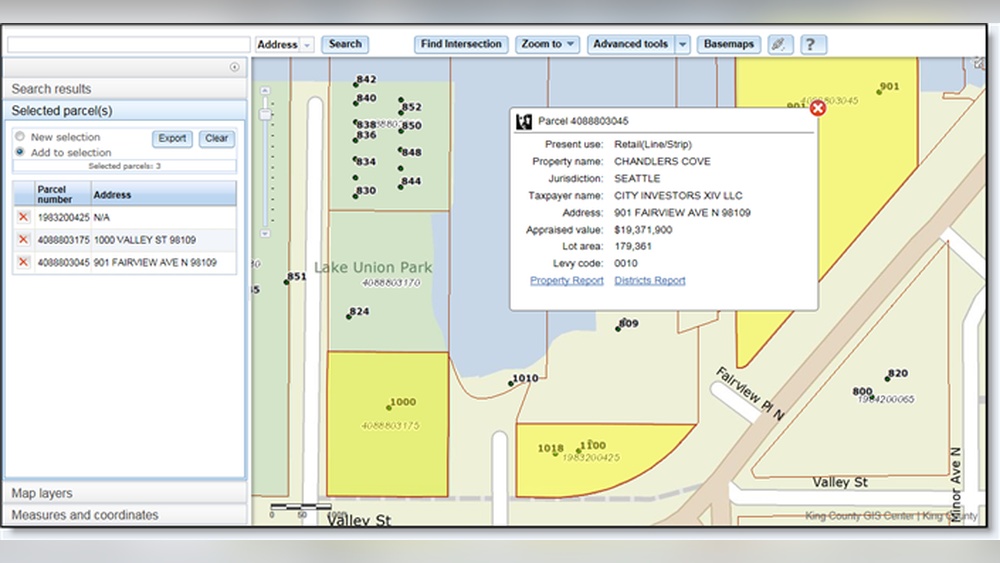
Are you trying to find detailed information about a property but don’t know where to start? County GIS maps can be your secret weapon.
These maps hold a treasure trove of data that can help you uncover property boundaries, ownership details, zoning information, and more—all at your fingertips. Imagine saving time and avoiding costly mistakes by getting the right info quickly. You’ll learn exactly how to use county GIS maps to get the property details you need, step by step.
Let’s dive in and make your property search easier than ever.
Accessing County Gis Maps
Accessing county GIS maps is the first step to find detailed property information. These maps show land boundaries, ownership, and other key details. Most counties offer these maps online for easy use. Understanding how to reach and use these resources helps you get accurate property data quickly.
Each county has its own system and website. Knowing where to look and how to navigate will save time and frustration. Follow the steps below to start accessing your county’s GIS maps.
Finding Your County’s Gis Website
Start by searching your county name and “GIS map” in a search engine. The official county website often appears at the top. Look for links labeled “GIS,” “Mapping,” or “Property Maps.”
Check that the site is from a government domain, usually ending in .gov. This ensures the data is reliable and up to date. Save the website link for easy return visits.
Navigating The Gis Portal
Once on the GIS portal, use the search bar to enter an address or parcel number. The map will zoom in to the property location. Tools let you view property lines, zoning, and owner information.
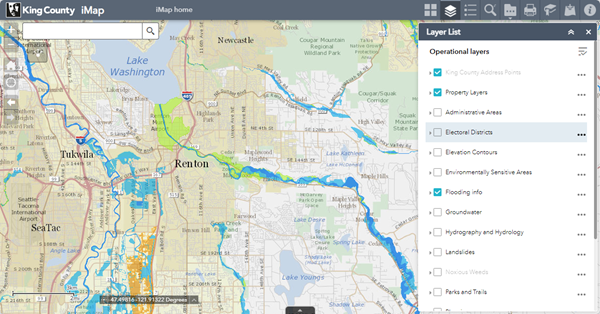
Use layers to add or remove details. These layers show things like flood zones or land use. Explore the different options to find the information you need.
Most portals have simple instructions or help guides. Use these resources if you feel stuck. With practice, the GIS portal becomes easy to use for all property searches.
Credit: www.jeffersoncountyny.gov
Searching For Property Information
Searching for property information on County GIS maps is simple. These maps store detailed data about land parcels. You can find ownership, boundaries, and property details in minutes. The key is knowing how to search effectively. Different methods work best for different needs.
Using Parcel Numbers
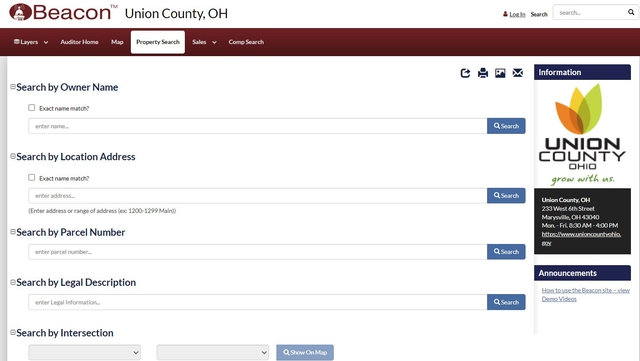
Every property has a unique parcel number. This number is often printed on tax bills or deeds. Entering this number in the GIS map search tool gives exact results. It quickly shows property boundaries and details. Using parcel numbers is the fastest way to find precise info.
Searching By Owner Name
Searching by owner name helps when you know who owns the property. Type the full or partial name in the search box. The system lists all properties linked to that name. This method works well for finding multiple properties owned by one person or company.
Locating Properties By Address
Address search is common and easy to use. Enter the street address, including city or ZIP code. The GIS map shows the property location on the map. It also provides details like lot size and zoning. This method suits those with an exact address but no other info.
Interpreting Map Data
Understanding how to read county GIS maps helps users get clear property information. These maps show many details in layers. Each layer gives a specific type of data. Reading these layers correctly is key to finding accurate property facts.
Understanding Property Boundaries
Property boundaries show the exact edges of land parcels. These lines separate one property from another. Boundaries help avoid disputes over land ownership. On GIS maps, boundaries appear as solid or dashed lines. Check these lines carefully to know the size and shape of the property.
Identifying Zoning And Land Use
Zoning tells what type of activities are allowed on the land. It may be residential, commercial, or agricultural. Land use shows how the property is currently used. Colors or patterns on the map represent different zones. Knowing zoning helps understand what can be built or done on the property.
Reading Tax And Assessment Details
Tax and assessment data provide financial information about a property. This includes property tax amounts and assessment values. These details appear as numbers or labels on the map. Reviewing tax data helps estimate property costs and taxes owed. It also shows if any tax liens exist on the property.
Credit: kingcounty.gov
Utilizing Map Tools
County GIS maps offer many tools to explore property information easily. These tools help you get precise details about land size, boundaries, and location. Using these features makes map navigation simple and effective. Understanding these tools improves your experience and accuracy when checking properties.
Measuring Distance And Area
GIS maps allow you to measure distances between points on a map. This helps to estimate road lengths or property borders quickly. You can also calculate the area of a land parcel. These measurements help in planning and comparing property sizes. The tools are easy to use with just a few clicks.
Layer Customization And Filters
Maps have layers showing different information like roads, buildings, and land use. You can turn layers on or off to see what you want. Filters help to highlight specific data, such as zoning or flood zones. Customizing layers makes it easier to focus on important property details. This keeps the map clean and relevant.
Printing And Exporting Maps
You can print maps directly from the GIS system for offline use. Export options let you save maps as images or PDFs. This is useful for sharing property info with others or keeping records. Printed maps show all selected layers and measurements. Exporting maps helps preserve your work for later use.
Common Challenges And Solutions
County GIS maps are useful tools for finding property information. Still, users face some common challenges. Knowing these challenges and how to solve them helps get accurate and timely data. This section covers two main issues: outdated information and restricted access areas.
Dealing With Outdated Information
GIS maps sometimes show old or incorrect property details. Data updates may happen slowly or not at all. This can cause confusion about property boundaries or ownership.
Check the map’s last update date before using the data. Visit the county’s official website for the latest records. Cross-check information with other sources like tax records or deeds. Reporting errors to the local GIS office can help improve the data for everyone.
Handling Restricted Access Areas
Some property information is limited due to privacy or security rules. Access to these areas on GIS maps might be blocked or incomplete.
Contact the county office for permission if you need sensitive data. Some counties offer special access for professionals or residents. Use public records and legal notices to gather more details about restricted properties.
Practical Tips For Effective Use
Using county GIS maps can simplify finding property information. Practical tips help you use these maps well. They make the search faster and more accurate. Focus on key steps to avoid common mistakes.
Cross-referencing With Other Resources
Always check GIS data against other sources. Public records, tax assessor websites, and property deeds offer extra details. Comparing helps confirm the information is correct. It also fills gaps that the GIS map might miss. Use multiple sources to get the full picture of the property.
Regularly Checking For Updates
GIS maps update their data at different times. Property boundaries, ownership, or zoning rules may change. Visit the GIS site often to see the latest updates. Keeping current ensures your information stays accurate. This is important for decisions about buying or selling land.
Credit: www.unioncountyohio.gov
Frequently Asked Questions
What Are County Gis Maps Used For?
County GIS Maps provide detailed geographic data. They help locate property boundaries, ownership, zoning, and land use. These maps assist in real estate research and urban planning. They are accessible online for public use in many counties.
How To Access County Gis Maps Online?
Most counties offer GIS Maps on official government websites. Users can search by address, parcel number, or owner name. Some platforms require free registration. Access is typically straightforward and available 24/7.
Can County Gis Maps Show Property Ownership?
Yes, GIS Maps often display property owner information. This includes names and parcel details. It helps buyers and sellers verify ownership before transactions. However, some sensitive data may be restricted.
Are County Gis Maps Updated Regularly?
County GIS Maps are updated periodically to reflect new developments. Update frequency varies by county, ranging from monthly to annually. Regular updates ensure accurate property and zoning information.
Conclusion
County GIS maps help you find property details quickly and easily. These maps show important information like boundaries, ownership, and land use. Anyone can access this data online for free or at local offices. Using these tools saves time and avoids guesswork.
Remember to check multiple sources for accuracy. Explore county GIS maps to get clear property info without hassle. Simple steps lead to smart decisions about land and homes.